Purchase Tax Calculator
Enter a price and a tax rate, then choose whether to add the tax to the price or strip the tax out of a total that already includes it. The tool shows the price before tax, the tax amount, the total including tax, and the tax on every $100.
The tax is rounded to the nearest cent, then added to the price, so the price before tax plus the tax amount always equals the total. In remove mode, the pre-tax price is the total divided by one plus the rate, and the tax is the total minus the pre-tax price. Enter the combined rate for the place of sale: the state rate plus any county, city and district additions, as one number.
Purchase tax is the tax added to the price of something you buy, usually called sales tax in the United States and value-added tax (VAT) in many other countries. This calculator adds that tax to a price, or strips it back out of a total that already includes it, and shows the tax amount and the final price.
How do I use the Purchase Tax Calculator?
Enter the price in the first box. In add mode, that is the price before tax: the sticker price or the subtotal on a receipt. In remove mode, it is the total you paid, tax included: the final figure on the receipt. The box accepts cents, so $49.99 goes in as 49.99, and the tool works to the cent throughout.
Enter the tax rate in the second box, as a percentage. Enter the combined rate for the place of sale: the state rate plus any county, city and district additions, added together into one number. A rate of 8 means 8%, and a rate of 8.25 means 8.25%. Do not enter the rate as a decimal: 8.25 is right, and 0.0825 would give a tax of eight cents on a $100 purchase instead of $8.25.
Choose the mode in the third box. “Add tax to the price” is already selected, and it is the mode for working out what a purchase will cost at checkout. “Remove tax from the total” is for working backwards from a receipt: you know what you paid, and you want to know how much of it was tax and how much was the price of the goods.
Press the calculate button and four labelled boxes appear. The first box is the price before tax, or the pre-tax price in remove mode. The second box is the tax amount. The third box is the total including tax, or the total you entered in remove mode. The fourth box is the tax on every $100: in add mode that is the rate itself in dollars, and in remove mode it is the share of each $100 of the total that is tax. Under the boxes, a note repeats the rate in plain words, and in remove mode it also shows the divisor the tool used.
If an input is wrong, the tool shows a plain-language error and no results. A price of 0 or a negative price is rejected, because a purchase needs a price above $0. A price above $100,000,000 is rejected as outside the range the tool covers. A rate below 0 is rejected, while a rate of 0 is allowed and gives a tax of $0.00 with a total equal to the price — which is the correct result in a place with no tax. A rate above 100 is rejected, because no purchase tax rate runs above 100%.
What does a worked example look like?
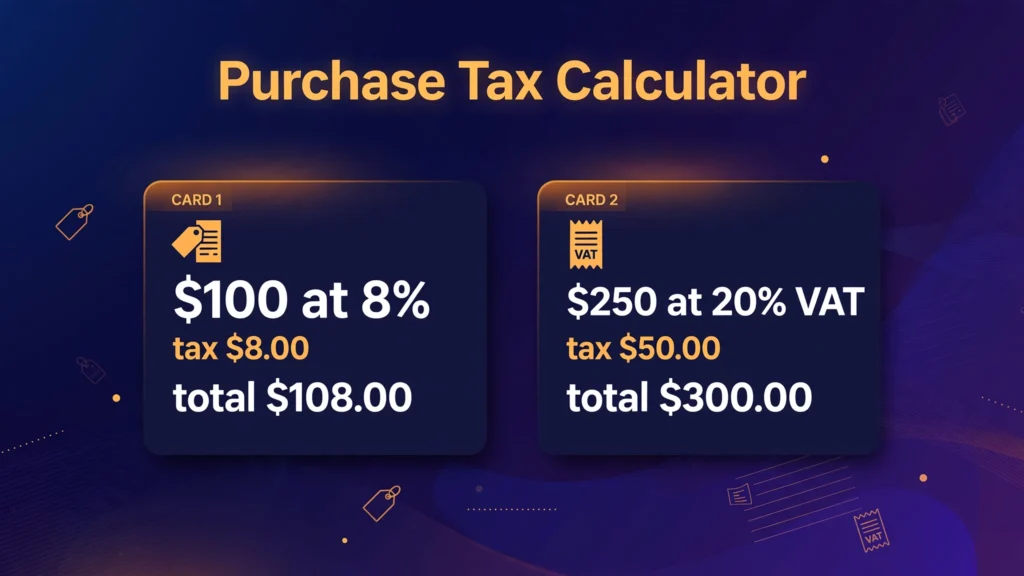
Start with the first verified test. A price of $100 at a tax rate of 8%, in add mode. The tax is $100 × 0.08 = $8.00. The total is $100.00 + $8.00 = $108.00. The tax on every $100 of price is $8.00, which is the rate itself in dollars.
A second test uses a VAT rate as the example. A price of $250 at 20% VAT, in add mode. The tax is $250 × 0.20 = $50.00. The total is $250.00 + $50.00 = $300.00. The tax on every $100 of price is $20.00. The 20% figure here is an example VAT rate used to show the arithmetic; VAT rates differ by country, and the VAT section below explains how the system works without stating any country’s current rate as fact.
A third test runs the same $100 purchase backwards. A total of $108 at 8%, in remove mode. The pre-tax price is $108 ÷ 1.08 = $100.00. The tax is $108.00 − $100.00 = $8.00. The tax in every $100 of the total is $7.41, which is less than $8.00, because the $100 of total includes the tax itself: $8.00 of tax sits inside $108.00 of total, and $8.00 ÷ $108.00 × $100 = $7.41.
A fourth test uses the Texas combined rate people search for. A price of $1,000 at 8.25%, in add mode. The tax is $1,000 × 0.0825 = $82.50. The total is $1,000.00 + $82.50 = $1,082.50. The tax on every $100 of price is $8.25.
A fifth test uses a car, where the tax is large enough to matter in a buying decision. A price of $35,000 at 8.25%, in add mode. The tax is $35,000 × 0.0825 = $2,887.50. The total is $35,000.00 + $2,887.50 = $37,887.50. On a purchase this size, half a percentage point of rate is worth $175.00, which is why the exact combined rate for the place of sale matters more than the state rate alone.
What is purchase tax?
Purchase tax is a tax on the sale of goods and some services, charged as a percentage of the price and collected by the seller at the point of sale. The seller adds it to the price, takes it from the buyer, and passes it on to the tax authority. The buyer pays it, the seller collects it, and the government receives it. That chain is the same in every system this page covers, whether the tax is called sales tax or VAT.
In the United States the tax is called sales tax, and it is set by states, counties and cities rather than by the federal government: there is no federal sales tax. A purchase in one city can carry a different rate from the same purchase in the next city, because the local additions differ. In most other countries the tax is called value-added tax, or VAT, and it is set at national level. The two systems collect the tax differently, and the VAT section below sets out how, but the arithmetic the buyer faces is the same in both: a percentage of the price, added to the price.
One meaning of the phrase “purchase tax” is not covered here. In Israel, purchase tax (Mas Rechisha) is a progressive tax on buying real estate, worked out from price brackets in shekels. That is a property tax, not a tax on the price of goods at a checkout, and this calculator does not model it. If you searched for the Israeli property tax, this page is not the tool you need. Everything on this page is about the tax added to a purchase price.
How do I add purchase tax to a price?
The formula has two steps. First, work out the tax: Tax = Price × (Rate ÷ 100). Second, add it to the price: Total = Price + Tax. A $75 item at 7% gives $75 × 0.07 = $5.25 of tax, and a total of $75.00 + $5.25 = $80.25.
The same result comes from one step, using a multiplier. Total = Price × (1 + Rate ÷ 100). At 8%, the multiplier is 1.08, so $100 × 1.08 = $108.00. At 8.25%, the multiplier is 1.0825, so $200 × 1.0825 = $216.50, with $16.50 of tax. The multiplier is worth remembering, because it is the same number the reverse calculation divides by, and because it makes the size of the tax easy to judge: a multiplier of 1.08 means the purchase costs 8% more than the sticker price.
The step where errors creep in is converting the rate to a decimal. A rate of 8.25% is 0.0825, not 0.825. A rate of 6% is 0.06, not 0.6. A quick check catches the mistake: the tax should be a small fraction of the price, usually under a tenth of it. If the tax comes out larger than the price, or close to it, the decimal point is in the wrong place.
The rate you enter is the combined rate, not the state rate alone. In the United States the rate at the register is normally a state rate with county, city and special-district levies stacked on top of it, all applied to the same pre-tax base and simply added together before the multiplication. A state rate of 6.25% with local additions of 2% gives a combined rate of 8.25%, and the tax is worked out on that 8.25%. Entering only the state rate understates the tax by the whole local share, which on a $35,000 car is $700.00.
How do I remove tax from a total price?
Working backwards from a receipt is the calculation people most often get wrong, because the tempting method is wrong. The wrong method is to multiply the total by one minus the rate: $108 × 0.92 = $99.36. That is $0.64 short of the true pre-tax price of $100.00. It is wrong because the tax was worked out on the pre-tax price, not on the total, so taking 8% off the total removes too much: the 8% comes off a figure that already includes the tax.
The correct method divides the total by one plus the rate. Pre-tax Price = Total ÷ (1 + Rate ÷ 100). Then subtract to find the tax: Tax = Total − Pre-tax Price. A receipt showing $212.00 in an area with an 8% rate gives $212 ÷ 1.08 = $196.30 as the pre-tax price, and $212.00 − $196.30 = $15.70 of tax. That matches the forward direction: $196.30 × 0.08 = $15.70, and $196.30 + $15.70 = $212.00.
The same division works at a VAT rate. A total of $300.00 that includes 20% VAT gives a pre-tax price of $300 ÷ 1.20 = $250.00, and tax of $300.00 − $250.00 = $50.00. The tax inside a total is always a smaller share of the total than the rate suggests: at 20%, $16.67 of every $100 of total is tax, not $20.00, because the $20.00 of tax sits inside $120.00 of total. The quick-reference table below shows that share at each common rate.
Remove mode is the mode for checking a receipt. A receipt that shows a subtotal, a tax line and a total can be checked in both directions: the tax line should equal the subtotal times the rate, and the total should equal the subtotal plus the tax line. If the tax line and the subtotal disagree by more than a cent or two, either the rate is not the one you assumed, or some lines on the receipt are not taxable, which the exemptions section below covers.
What is the difference between sales tax and VAT?
Sales tax and VAT are both taxes on what people buy, and both are collected by businesses and passed on to the government, but they are collected at different points. Sales tax, used in the United States, is charged once, at the final sale to the consumer. Only the end customer pays it, and the seller collects it and passes it on. VAT, used across Europe, Canada and many other countries, is charged at each stage of production and distribution: the maker pays VAT on materials, the wholesaler pays VAT on the maker’s goods, and the retailer pays VAT on the wholesaler’s price.
The difference that matters to a business is the input credit. Under VAT, each business can usually reclaim the VAT it has already paid on its inputs, so it only passes on the difference between the VAT it charged and the VAT it paid. The tax therefore falls on the value each business adds, which is where the name comes from. Under sales tax there is no input credit: business-to-business sales are generally exempt when the buyer provides a resale certificate, and the tax is collected only on the final sale.
The difference that matters to a buyer is what the sticker price shows. Under VAT the tax is usually included in the price on the shelf, so the price you see is the price you pay. Under US sales tax the tax is added at the register, so the price you see is not the price you pay: a $100 item at 8% costs $108.00 at the checkout. That is why the add mode of this calculator exists, and why a visitor from a VAT country is often surprised by an American total.
For the buyer’s arithmetic, the two systems are the same. A rate of 20% on a price of $250 gives $50.00 of tax and a $300.00 total whether the tax is called VAT or sales tax, and a total of $300.00 that includes 20% gives back a pre-tax price of $250.00 by the same division. The rate maths does not change; only the collection point and the price display change. The United States has no VAT, and no state in the United States charges one.
| Sales tax (United States) | VAT (most other countries) | |
|---|---|---|
| Charged | Once, at the final sale to the consumer | At each stage of production and distribution |
| Set by | State and local governments | National government |
| Input credit for businesses | No; business sales are generally exempt with a resale certificate | Yes; businesses reclaim VAT paid on inputs |
| Price on the shelf | Usually shown before tax; tax added at checkout | Usually shown including tax |
| Federal or national version | None in the United States | The standard system in most countries |
How much sales tax is there in Texas?
Texas is the state people search for most often when they ask about sales tax, because its rate is easy to state and the combined figure is one of the highest in the country. The state rate is 6.25%. Local jurisdictions — cities, counties, transit authorities and special-purpose districts — can add up to 2% more, so the maximum combined rate is 8.25%.
At the maximum combined rate of 8.25%, the tax on a $100 purchase is $8.25, and the total is $108.25. On a $1,000 purchase the tax is $82.50 and the total is $1,082.50. On a $35,000 car the tax is $2,887.50 and the total is $37,887.50. Those figures are the Texas examples used in the worked example and the live tests, and they are the reason the Texas rate is worth knowing exactly rather than approximately.
The combined rate depends on the address of the sale, not on the state alone. A purchase in Houston carries a different local addition from a purchase in Austin, and both differ from a purchase in an unincorporated area with no city tax. The official source for the exact rate at a given address is the Texas Comptroller of Public Accounts, which publishes a rate lookup by address. Enter the rate for the address of the sale, not the state rate and not a neighbouring city’s rate.
Which US states have no sales tax?
Five states have no statewide sales tax: Alaska, Delaware, Montana, New Hampshire and Oregon. A purchase in one of those states carries no state sales tax at the register, which is why they are sometimes called the NOMAD states, from the first letters of their names.
Alaska is the exception to the rule, because it allows its local areas to charge their own tax. A purchase in Anchorage carries no local sales tax, but a purchase in Juneau carries a local rate of 5%, and other Alaskan towns and boroughs set their own rates. The other four states — Delaware, Montana, New Hampshire and Oregon — have no state tax and no local sales tax either, so a purchase there carries no sales tax at all.
A state with no sales tax is not a state with no tax. Delaware raises revenue through a gross receipts tax on businesses, Montana through income and property taxes, New Hampshire through property and business taxes, and Oregon through income tax. The absence of a sales tax does not mean the price is lower in every case: a state without a sales tax may charge more through other taxes, and the price on the shelf may already reflect those costs. The calculator only works out the purchase tax, so it gives $0.00 of tax at a 0% rate in a state with no sales tax.
Do discounts, shipping and exemptions change the tax?
A discount normally reduces the price the tax is worked out on. A store discount of 25% on an $80 item brings the price to $60.00, and the tax at 8% is $60.00 × 0.08 = $4.80, for a total of $64.80. The discount is applied first, then the tax is worked out on the discounted price. That is the usual order, and it is the order the FAQ on discounts below confirms.
A manufacturer’s coupon is not the same as a store discount, and in some states it is treated differently. A store discount reduces the price, because the store absorbs the reduction. A manufacturer’s coupon is a payment from the manufacturer, not a reduction in the price, so some states tax the full price before the coupon. A receipt with a manufacturer’s coupon can therefore show a tax figure that does not match a calculation on the discounted price, and the difference is the coupon amount times the rate. The exemption rules for coupons vary by state, so a coupon that changes the tax in one state may not change it in another.
Shipping is handled differently again. In most states, a delivery charge that is part of the sale is taxable in the same way as the goods, so a $100 item with a $10 delivery charge is taxed on $110.00, giving $8.80 of tax at 8%. A few states do not tax delivery when the charge is stated separately and the buyer has the option of collecting the goods, and a few do not tax it at all. The treatment depends on the state, so a delivery charge that is taxed in Texas may not be taxed in another state. If the delivery charge is included in the price you enter, the tax will be worked out on it; if it is charged separately and you want the tax on the goods alone, enter the goods price without the delivery charge.
Exemptions are the other common reason a receipt does not match a simple calculation. Most states exempt some categories: groceries and unprepared food in many states, prescription medicines and many medical items, and clothing below a threshold in a few states. A receipt that mixes taxable and exempt lines is taxed only on the taxable lines, so the tax is lower than the rate times the whole subtotal. The calculator takes one price and one rate, so a mixed receipt needs the taxable subtotal worked out first and entered as the price.
How is tax rounded on a receipt?
Tax is rounded to the nearest cent. The rounding is applied to the tax, not to the price, and it happens once per line, not once per receipt. A tax of $5.2575 is rounded to $5.26, and a tax of $4.124 is rounded to $4.12. The tool rounds each result to two decimal places, which is the same rounding a receipt uses, so the boxes always add up exactly: the price before tax plus the tax amount equals the total, to the cent.
Half cents are rounded up. A tax that falls exactly on a half cent — $0.005, $0.015, $0.025 and so on — is rounded up to the next cent, so $0.005 becomes $0.01. That is the rule this tool uses, and it is the rule most receipts use. A tax that is a fraction of a cent below the half cent is rounded down: $0.004 becomes $0.00, and $0.014 becomes $0.01.
Rounding can explain a one-cent difference between a receipt and a calculation done by hand. A receipt with several lines is rounded line by line, and the line roundings can add up: three lines each rounded up by half a cent give a total one or two cents higher than a calculation that rounds only once at the end. A difference of a cent or two on a multi-line receipt is normal rounding, not an error. A difference larger than that points to a different rate, an exempt line, or a discount applied in a different order.
What mistakes do people commonly make with purchase tax?
The most common mistake is entering the rate as a decimal. A rate of 8% must be entered as 8, not as 0.08. Entering 0.08 gives a tax of eight cents on a $100 purchase, which is a hundred times too small. The tool does not warn about this, because 0.08% is a valid rate in its own right, so the mistake produces a wrong answer without an error. If the tax comes out absurdly small, the rate was probably entered as a decimal.
The second most common mistake is entering the state rate instead of the combined rate. A state rate of 6.25% with local additions of 2% gives a combined rate of 8.25%, and entering only 6.25% understates the tax by 2% of the price — $70.00 on a $3,500 purchase, and $700.00 on a $35,000 car. The combined rate is the rate at the register, and it is the rate the tool needs.
The third mistake is taking the tax off the total instead of dividing it out. Multiplying a $108 total by 0.92 gives $99.36, which is $0.64 short of the true pre-tax price of $100.00. The correct method divides the total by one plus the rate: $108 ÷ 1.08 = $100.00. The difference is small on a $108 receipt and large on a $10,800 receipt, where the wrong method is $64.00 short.
The fourth mistake is taxing the discounted price when the discount is a manufacturer’s coupon. A store discount reduces the price, so the tax is worked out on the discounted price. A manufacturer’s coupon is a payment from the manufacturer, and in some states the tax is worked out on the full price before the coupon. A receipt with a manufacturer’s coupon can therefore show a tax figure that does not match a calculation on the discounted price, and the difference is the coupon amount times the rate.
The fifth mistake is forgetting that shipping can be taxable. A delivery charge that is part of the sale is taxable in most states, so a $100 item with a $10 delivery charge is taxed on $110.00. Entering only the goods price gives a tax that is $0.80 short at 8%. If the delivery charge is included in the price you enter, the tax will be worked out on it; if it is charged separately and you want the tax on the goods alone, enter the goods price without the delivery charge.
The sixth mistake is assuming the rate is the same everywhere. A rate that is correct in one city can be wrong in the next, because the local additions differ. A purchase in Houston carries a different local addition from a purchase in Austin, and both differ from a purchase in an unincorporated area with no city tax. The official source for the exact rate at a given address is the tax authority for that place.
The seventh mistake is rounding the tax before adding it to the price. The tax is worked out on the unrounded price, then rounded once to the nearest cent, then added. Rounding the price first and then working out the tax gives a slightly different answer, and on a large purchase the difference can be more than a cent. The tool rounds each result to two decimal places, which is the same rounding a receipt uses.
What are the limits of this calculator?
This calculator does not look up tax rates. It takes the rate you enter and does the arithmetic, so the result is only as good as the rate. The combined rate for a specific address comes from the tax authority for that place — in Texas, the Comptroller of Public Accounts — and rates change, so a rate used for a real purchase should be checked at the time of the sale.
It does not handle exemptions item by item. It takes one price and one rate, so a receipt with taxable and exempt lines needs the taxable subtotal worked out first and entered as the price. It does not handle shipping rules, trade-in allowances, manufacturer’s coupons, or multi-item receipts where the tax is rounded line by line, and a result from such a receipt can differ by a cent or two from the figure shown here.
It works in dollars and with a single rate. It does not convert currencies, and it does not model taxes charged at more than one rate on the same purchase, such as a rate that differs between goods and services in the same sale. A purchase that mixes rates needs each part worked out separately and the results added together.
The figures it gives are estimates for checking a price or a receipt. They are not a tax return, and this page gives general information about purchase tax, not tax advice. Tax rules depend on the place of sale, the item, and the buyer’s situation, and they change over time, so a question about what is owed on a real transaction belongs to the tax authority concerned or to a tax professional. To compare the cost of a purchase with the cost of borrowing for it, the loan calculator works out what a loan over the same amount would cost.
How can I check the tool against a known price?
The simplest check uses the first verified test. Enter a price of $100, a rate of 8%, and the add mode. The tool should show a price before tax of $100.00, a tax amount of $8.00, a total including tax of $108.00, and tax on every $100 of price of $8.00, with the note “At 8%, the tax is $8.00 on every $100 of price. The total is the price plus the tax.” Every box should match.
A second check uses the remove mode. Enter a total of $108, a rate of 8%, and the remove mode. The tool should show a pre-tax price of $100.00, a tax amount of $8.00, the total you entered as $108.00, and tax in every $100 of the total of $7.41, with the note “At 8%, $7.41 of every $100 of the total is tax. The pre-tax price is the total divided by 1.0800.” Every box should match.
A third check uses a less round number, to catch a rounding error. Enter a price of $49.99, a rate of 8.25%, and the add mode. The tax is $49.99 × 0.0825 = $4.124175, which rounds to $4.12. The total is $49.99 + $4.12 = $54.11. The tool should show a tax amount of $4.12 and a total including tax of $54.11. If it shows $4.13 or $54.12, the rounding is wrong.
The two formulas, in one place:
Add mode: Tax = Price × Rate ÷ 100, and Total = Price + Tax. Remove mode: Pre-tax Price = Total ÷ (1 + Rate ÷ 100), and Tax = Total − Pre-tax Price. A quick check at any rate is to run the forward calculation and then the reverse: the reverse should return the price you started with, to the cent.
How much tax is on $100 at common rates?
The table below works out the tax on a $100 price at the rates people search for, and the tax inside a $100 total at the same rates. Read it in either direction: the second and third columns start from a price before tax, and the fourth and fifth columns start from a total that already includes tax.
| Rate | Tax on a $100 price | Total | Pre-tax price inside a $100 total | Tax inside a $100 total |
|---|---|---|---|---|
| 5% | $5.00 | $105.00 | $95.24 | $4.76 |
| 6% | $6.00 | $106.00 | $94.34 | $5.66 |
| 7% | $7.00 | $107.00 | $93.46 | $6.54 |
| 8% | $8.00 | $108.00 | $92.59 | $7.41 |
| 10% | $10.00 | $110.00 | $90.91 | $9.09 |
| 20% | $20.00 | $120.00 | $83.33 | $16.67 |
Two patterns show in the table. In the second column, the tax on a $100 price is the rate itself in dollars: 5% gives $5.00, 8% gives $8.00, and 20% gives $20.00. In the fifth column, the tax inside a $100 total is always less than the rate: 8% gives $7.41, and 20% gives $16.67. The gap grows as the rate grows, because the tax is a share of a total that already includes it.
The table also shows the smallest price that carries a cent of tax at each rate. At 8%, a price of $0.13 gives a tax of $0.01, because $0.13 × 0.08 = $0.0104, which rounds to $0.01. At 20%, a price of $0.05 gives a tax of $0.01, because $0.05 × 0.20 = $0.01 exactly. A price below those figures gives no tax at all, which is why small items are often sold tax-free in practice even where the rate applies.
Frequently asked questions
How do I calculate purchase tax on a price?
Multiply the price by the tax rate and divide by 100, then add the result to the price. A $100 purchase at 8% gives $100 × 8 ÷ 100 = $8.00 of tax, and a total of $108.00. This calculator does that arithmetic for you in add mode, and it also shows the tax on every $100 of price.
How do I remove tax from a total that already includes it?
Divide the total by one plus the rate, then subtract the result from the total to get the tax. A $108.00 total at 8% gives $108 ÷ 1.08 = $100.00 as the pre-tax price, and $108.00 − $100.00 = $8.00 of tax. Do not multiply the total by one minus the rate: $108 × 0.92 = $99.36, which is $0.64 short. Use the remove mode on this calculator.
What is the difference between sales tax and VAT?
Sales tax, used in the United States, is charged once, at the final sale to the consumer, and is usually added to the price at the checkout. VAT, used in most other countries, is charged at each stage of production and distribution, with each business reclaiming the VAT it paid on its inputs, and it is usually included in the price on the shelf. For the buyer the rate maths is the same: a 20% rate on $250 gives $50.00 of tax and a $300.00 total under either system.
How much sales tax is there in Texas?
Texas charges a state sales tax rate of 6.25%, and local jurisdictions can add up to 2% more, so the maximum combined rate is 8.25%. At 8.25%, the tax on a $100 purchase is $8.25 and the total is $108.25. The exact combined rate depends on the address of the sale, so check the Texas Comptroller of Public Accounts for the rate at a specific address.
Which states have no sales tax?
Five states have no statewide sales tax: Alaska, Delaware, Montana, New Hampshire and Oregon. Alaska allows its local areas to charge their own tax, so a purchase there can still carry a local rate. The other 45 states and Washington, D.C. have a statewide sales tax.
Is the tax worked out before or after a discount?
Normally after the store’s discount. An $80 item with 25% off sells for $60.00, and the tax at 8% is $60.00 × 0.08 = $4.80, for a total of $64.80. A manufacturer’s coupon is treated differently from a store discount in some states, so a receipt with one can show a tax figure that does not match a simple calculation on the discounted price.