
Tile Sq Ft Calculator
Tile Sq Ft Calculator
A tile sq ft calculator turns room size and tile size into a shopping list: how much floor you have, how many tiles cover it exactly, how many tiles to buy once cuts and breakages are allowed for, and how many whole boxes that means.
That one sentence is the whole job of the tool. The rest of this page explains each step, so you can check the answer, change the waste allowance for your layout, and avoid the mistakes that leave a job short by a box or stuck with tiles from a different batch.
How do I use the tile sq ft calculator?
Start with the room. Measure the length and width of the floor you plan to tile, in feet, and enter those two numbers first. Measure at the widest points if the walls are not quite square, and measure the area you will actually tile, not the whole room if part of it will stay untiled. A separate section below covers L-shaped rooms and rooms with a large fixed bath or island.
Next, enter the tile size in inches, exactly as it is sold. Tiles are usually sold by their nominal size in inches, for example 12 x 12 inches or 18 x 18 inches, even when the room is measured in feet. The tool converts inches to feet for you, so do not convert the tile size yourself before entering it. Entering 1 foot instead of 12 inches would still work arithmetically, but it invites a slip, and the tool is built around the size printed on the box.
Then set the waste percentage. The default is 10%, which suits a straight grid layout in a fairly regular room. If your layout is diagonal or patterned, raise it; the waste guidance table below gives the figures to choose from. Finally, enter the number of tiles per box, as printed on the box or product page. That number varies by tile size and brand, so do not guess it. The default of 10 suits the worked examples on this page, but your box may hold a different number, and the box count will change with it.
Press Calculate. The tool shows five results: floor area in square feet, tile area in square feet, exact tiles needed, tiles to buy, and boxes to buy. Read them in that order. The exact tile figure tells you what the floor needs with no allowance at all. The tiles-to-buy figure is the one to order from, and the boxes figure is that number rounded up to whole boxes, because tile is sold by the box, not by the single tile.
If you change any input, press Calculate again. A zero, a negative number, or a blank field produces a plain-language error and no results, rather than a misleading answer. In particular, a zero or negative room length shows the error and no results, which is the correct behaviour: a room with no length has no area to tile.
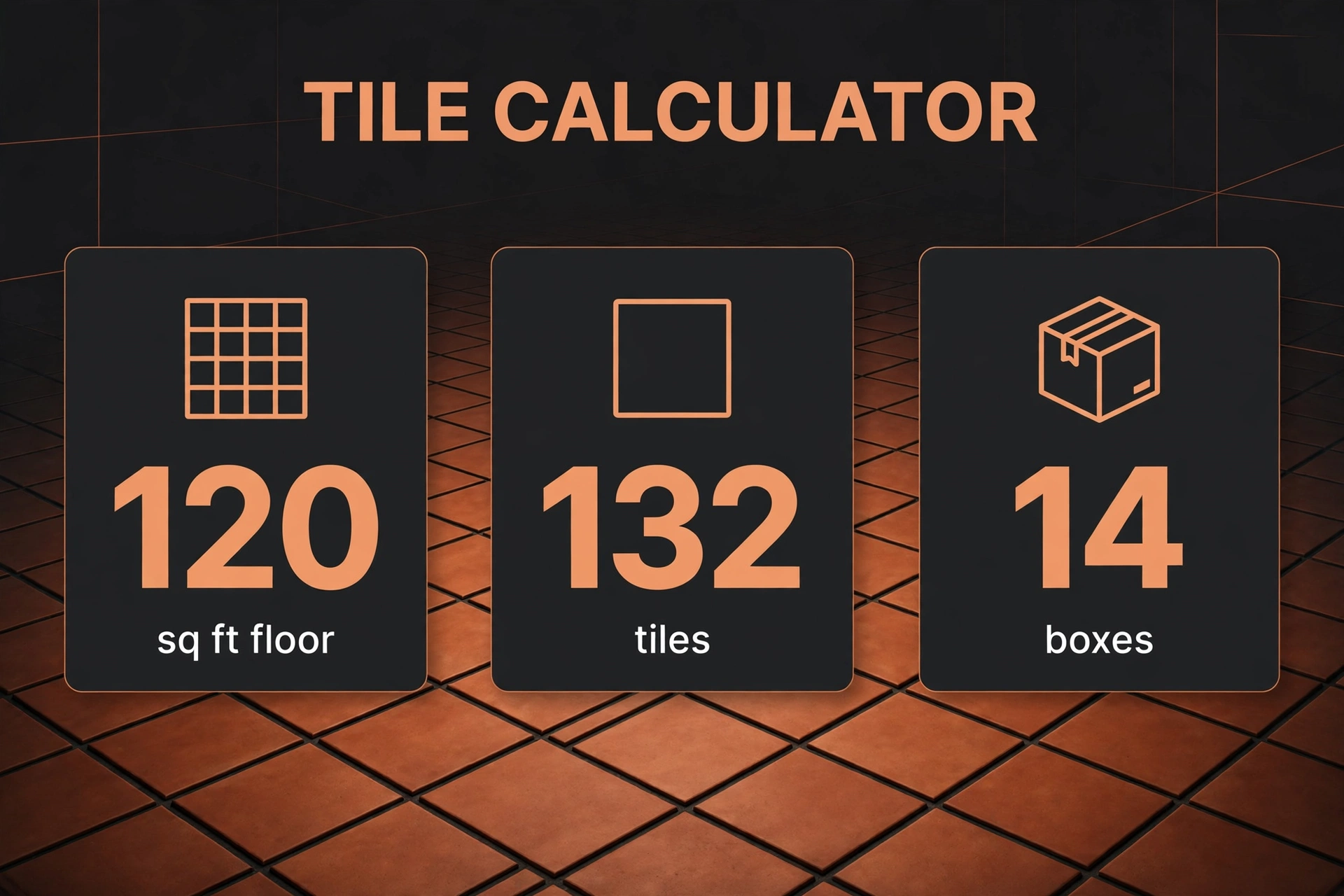
A worked example from the live tool
Work through the first verified test step by step. The room is 12 feet long and 10 feet wide, the tiles are 12 x 12 inches, the waste allowance is 10%, and each box holds 10 tiles.
First, find the floor area. Area is length multiplied by width, so 12 feet multiplied by 10 feet gives 120.00 square feet. That is the area the tiles must cover before any allowance for cuts.
Second, find the area of one tile in square feet. The tile is sold in inches, so each side must be converted to feet first. There are 12 inches in a foot, so 12 inches equals 1 foot. The tile area is therefore 1 foot multiplied by 1 foot, which is 1.0000 square feet. Showing this step matters, because it is the step where feet and inches are most often mixed up. A tile area worked out in square inches, and then divided into a floor area in square feet, would give an answer 144 times too large.
Third, divide the floor area by the tile area. That gives 120.00 divided by 1.0000, which is 120.00 exact tiles. This is the count with no waste at all: the number of whole 12 x 12 inch tiles that would fill a perfect 12 x 10 foot rectangle with no cuts, no breakages and no spares.
Fourth, add waste. Ten percent of 120 is 12, so 120 multiplied by 1.10 gives 132 tiles to buy. The tool rounds this figure up to a whole tile, because you cannot buy part of a tile. In this example the result is already whole, but the rounding rule matters in the other verified tests, and it matters in real rooms where the exact count is rarely a round number.
Fifth, turn tiles into boxes. Divide 132 tiles by 10 tiles per box, which gives 13.2 boxes. You cannot buy 0.2 of a box, so the tool rounds up to 14 boxes. Those 14 boxes hold 140 tiles, which leaves 8 spare tiles beyond the 132 to buy. Those spares are useful: they cover a tile broken during fitting and give you matching tiles for a future repair, when the same batch may no longer be available.
So the full answer for this room is: 120.00 square feet, 1.0000 square feet per tile, 120.00 exact tiles, 132 tiles to buy, and 14 boxes. Every other result on this page follows the same five steps, with only the inputs changed.
How does the maths work?
The maths has four steps, and each one answers a different question. Keeping them separate is what makes the result easy to check.
Floor area answers how much floor there is. For a rectangle, area equals length multiplied by width, with both measurements in feet. A 12 x 10 foot room is 120 square feet. A 15 x 12 foot room is 180 square feet. A 10 x 8 foot room is 80 square feet. If you want to check a rectangle area on its own, the rectangle area calculator works through the same length-times-width step.
Tile area answers how much floor one tile covers. Tile sizes are given in inches, so each side is divided by 12 to turn inches into feet, and the two sides are then multiplied. A 12 x 12 inch tile is (12 / 12) multiplied by (12 / 12), which is 1.0000 square feet. An 18 x 18 inch tile is (18 / 12) multiplied by (18 / 12), which is 1.5 multiplied by 1.5, or 2.2500 square feet. A 6 x 6 inch tile is (6 / 12) multiplied by (6 / 12), which is 0.5 multiplied by 0.5, or 0.2500 square feet. Larger tiles cover more floor each, so fewer of them are needed, and the tile-area figure is where that difference shows up.
Exact tiles answers how many tiles fill the floor with no allowance. It is floor area divided by tile area. For the 12 x 10 foot room with 12 x 12 inch tiles, that is 120.00 divided by 1.0000, which is 120.00 tiles. For the 15 x 12 foot room with 18 x 18 inch tiles, it is 180.00 divided by 2.2500, which is 80.00 tiles. For the 10 x 8 foot room with 6 x 6 inch tiles, it is 80.00 divided by 0.2500, which is 320.00 tiles. Small tiles mean a much larger count for the same floor, which is worth knowing before choosing a tile size, since every extra tile is another piece to lay and another joint to grout.
Tiles to buy answers how many tiles to order. It is the exact count multiplied by one plus the waste percentage, rounded up to a whole tile. With 10% waste, multiply by 1.10. With 15% waste, multiply by 1.15. The rounding-up step is not a detail to skip: you cannot buy part of a tile, and rounding down would leave the job short. A result of 132.1 tiles must be ordered as 133 tiles, not 132.
Boxes to buy answers how many boxes to order. It is tiles to buy divided by tiles per box, rounded up to a whole box. With 132 tiles and 10 tiles per box, that is 13.2, rounded up to 14 boxes. With 88 tiles and 10 per box, it is 8.8, rounded up to 9 boxes. With 368 tiles and 10 per box, it is 36.8, rounded up to 37 boxes. In each case the spare tiles left over are the difference between the boxes bought and the tiles needed, and they are best kept, not returned, if the supplier allows it, because matching tiles later can be hard to find.
How much waste should I allow?
Waste is the extra allowance for tiles cut at edges and around obstacles, tiles broken during cutting or fitting, and tiles that do not fit the pattern at a wall. It is not an exact measurement. It is a judgement based on the layout, and choosing it well is the difference between finishing the job and running short near the end.
| Layout | Waste guidance | When to use it |
|---|---|---|
| Straight grid, tiles laid square to the walls | 10% | A regular rectangular room, tiles in straight rows, few obstacles |
| Diagonal layout, tiles laid at an angle to the walls | 15% | Tiles turned 45 degrees, so every wall edge needs an angled cut |
| Patterned layout, including herringbone | 15–20% | Herringbone and other patterns with many angled cuts and offcuts that cannot be reused |
Use 10% as the starting point for a straight layout. Raise it to 15% for a diagonal layout, because angled cuts at the walls produce more offcuts that cannot be used elsewhere. For a patterned layout such as herringbone, allow 15–20%, and take the higher end when the room has many corners, niches or awkward edges. These figures are guidance to choose from, not measured data from a particular job, and they are presented that way so the reader can adjust them rather than treat them as fixed.
It is also worth saying what the waste percentage does not cover. Grout joints, cuts around fixtures, pattern matching in a patterned layout, and spare tiles for future repairs are not included beyond the waste percentage itself. This tool does not model grout-joint width, so the tile area is the nominal tile size, not tile plus joint. If you want a generous margin for future repairs, add a box on top of the calculated result rather than relying on the waste allowance alone, since waste tiles are mostly used up during fitting.
How do I measure a room that is not a simple rectangle?
Measure at the widest points first. Walls are rarely perfectly square, and measuring the longest length and the longest width gives a safer area than measuring a short stretch and assuming the rest matches. If the room tapers or bulges, the widest measurements will overstate the area slightly, but a small overstatement is far better than a shortage, and the waste allowance absorbs part of it.
For an L-shaped room, split the floor into two rectangles and add their areas. Measure each rectangle separately, work out length multiplied by width for each one, and add the two areas together. Then enter the total area into the tool by choosing room dimensions that multiply to that total, or work the tile count from the total area directly using the same steps: total area divided by tile area, then waste, then boxes. Do not measure across the missing corner of the L as if it were floor, because that counts area that will never be tiled.
For a room with a large fixed bath, island or fitted unit that will not be tiled underneath, measure the tiled area only. This tool does not deduct fixtures: it calculates from the room length and width you enter, so if you enter the gross room size for a room with a large untiled area, the result will overstate the tiles needed. Measure around the fixed item, split the remaining floor into rectangles as above, and enter the tiled area. For small fixtures, such as a pedestal basin or a toilet, many fitters keep the gross area and let the waste allowance absorb the difference, since cutting around a small fixture uses tiles anyway. The rule of thumb is simple: deduct large areas you will never tile, and do not worry about small ones.
What mistakes do people make when ordering tiles?
The most common mistake is mixing inches and feet. Room sizes are usually in feet and tile sizes are usually in inches, and the two must not be divided into each other without conversion. Dividing a floor area in square feet by a tile area in square inches gives a count 144 times too large, because one square foot holds 144 square inches. The tool avoids this by converting each tile side from inches to feet before multiplying, and the worked example shows that conversion step by step.
The second mistake is forgetting waste altogether. Ordering the exact tile count leaves no room for a single cut tile, let alone a breakage. A room that needs 120 exact tiles and is ordered as 120 tiles will run short at the first wall edge. Always order the tiles-to-buy figure, not the exact figure, and keep the spare tiles from the rounded-up boxes.
The third mistake is using the gross room area for a room with a large untiled area. A kitchen with a large island that will not be tiled underneath, or a bathroom with a large fixed bath, needs fewer tiles than the full room rectangle suggests. Measure the tiled area only, as described above, or the order will include tiles for floor that will never be seen.
The fourth mistake is buying exact tiles with no spares for later. Tiles break, and batches change shade slightly between production runs. A tile bought months later may not match the floor, even if the size and product name are the same. The boxes figure already rounds up, which leaves some spares, but for a floor you expect to keep for years, keeping one spare box sealed is a cheap safeguard.
A fifth, quieter mistake is guessing the tiles-per-box figure. Box counts vary by tile size and brand, and a guess of 10 when the box actually holds 8 changes the box count by a quarter. Check the box label or product page before ordering, and enter the exact number.
What does this calculator not do?
This tool calculates tile counts and box counts for a rectangular tiled area. It does not calculate grout quantity, adhesive quantity, or cost, and it does not deduct fixtures or model grout-joint width. It does not measure the room for you, and it cannot see slopes, steps or curved edges. For a curved or very irregular floor, split the area into rectangles and triangles as best you can, and treat the result as an estimate rather than an exact order.
The result is also only as good as the measurements entered. A room measured to the nearest foot will give a rougher answer than a room measured to the nearest inch, and a tile size taken from memory may differ from the size on the box. Measure twice, check the box label, and use the waste guidance to absorb the remaining uncertainty. If the result looks far from what you expected, check the units first: feet for the room, inches for the tiles, and the tiles-per-box figure from the label.
The tool also gives no fitting advice. Laying tile, cutting around obstacles, waterproofing a wet room and levelling a floor are skilled jobs with their own safety and building considerations. This page helps you order the right quantity; it does not tell you how to fit the tiles, and nothing here should be read as fitting, building or safety advice.
Does the calculator store my measurements?
No. The calculation runs from the numbers you enter, and this page does not ask for a name, address or account. If you close the page, your inputs go with it, and you will need to enter them again on a later visit. That is worth knowing if you are comparing tile sizes: note the results for each size before you change the inputs, or the earlier figures will be lost when the new calculation replaces them.
Related tools
- Work out a rectangle area first with the rectangle area calculator.
- For an outdoor area measured in the same way, the dirt calculator covers volume from area and depth.
- Browse the full set in the Calculators category.
Frequently asked questions
How many tiles do I need for a 12 x 10 foot room with 12 x 12 inch tiles?
For a 12 x 10 foot room, the floor area is 120.00 square feet, and a 12 x 12 inch tile covers 1.0000 square feet, so the exact count is 120.00 tiles. With 10% waste, buy 132 tiles, which is 14 boxes at 10 tiles per box.
How do I convert tile size from inches to square feet?
Divide each tile side in inches by 12 to get feet, then multiply the two sides. A 12 x 12 inch tile is 1 foot by 1 foot, or 1.0000 square feet. An 18 x 18 inch tile is 1.5 feet by 1.5 feet, or 2.2500 square feet.
How many boxes of tile do I need?
Divide the tiles to buy, including waste, by the tiles per box, and round up to a whole box. For 132 tiles at 10 per box, that is 13.2, rounded up to 14 boxes. For 88 tiles at 10 per box, it is 8.8, rounded up to 9 boxes.
What waste percentage should I use for a diagonal or herringbone layout?
Use 15% for a diagonal layout and 15–20% for a patterned layout such as herringbone, as guidance to choose from. A straight grid layout in a regular room can use 10%. Raise the figure when the room has many corners or awkward edges.
Does this calculator deduct the area of a bath or island?
No. This tool does not deduct fixtures. For a room with a large fixed bath or island, measure the tiled area only and enter that area, rather than the gross room size.
Why does the tool round up to whole tiles and whole boxes?
Because you cannot buy part of a tile or part of a box. Rounding down would leave the job short, so the tool rounds tiles to buy up to a whole tile and boxes to buy up to a whole box.
How many tiles do I need for a 12 x 10 foot room with 12 x 12 inch tiles?
For a 12 x 10 foot room, the floor area is 120.00 square feet, and a 12 x 12 inch tile covers 1.0000 square feet, so the exact count is 120.00 tiles. With 10% waste, buy 132 tiles, which is 14 boxes at 10 tiles per box.
How do I convert tile size from inches to square feet?
Divide each tile side in inches by 12 to get feet, then multiply the two sides. A 12 x 12 inch tile is 1 foot by 1 foot, or 1.0000 square feet. An 18 x 18 inch tile is 1.5 feet by 1.5 feet, or 2.2500 square feet.
How many boxes of tile do I need?
Divide the tiles to buy, including waste, by the tiles per box, and round up to a whole box. For 132 tiles at 10 per box, that is 13.2, rounded up to 14 boxes. For 88 tiles at 10 per box, it is 8.8, rounded up to 9 boxes.
What waste percentage should I use for a diagonal or herringbone layout?
Use 15% for a diagonal layout and 15–20% for a patterned layout such as herringbone, as guidance to choose from. A straight grid layout in a regular room can use 10%. Raise the figure when the room has many corners or awkward edges.
Does this calculator deduct the area of a bath or island?
No. This tool does not deduct fixtures. For a room with a large fixed bath or island, measure the tiled area only and enter that area, rather than the gross room size.
Why does the tool round up to whole tiles and whole boxes?
Because you cannot buy part of a tile or part of a box. Rounding down would leave the job short, so the tool rounds tiles to buy up to a whole tile and boxes to buy up to a whole box.