Rate Calculator
Enter the loan amount, the fixed monthly payment and the term in months. The tool works out the annual interest rate hidden in those three numbers, plus the monthly rate, the total paid and the total interest.
The rate shown is the nominal annual interest rate: the monthly rate multiplied by 12. It is not necessarily the APR, because the APR can also include fees such as origination charges. This tool is for information only and is not financial advice.
A rate calculator works out the annual interest rate hidden inside a loan's monthly payment. Enter the loan amount, the fixed monthly payment and the term in months, and it returns the rate that makes those three numbers agree — for example, a $100,000 loan repaid at $2,027.64 a month for 60 months carries an annual rate of 8.00%.
How do I use the Rate Calculator?
Enter the loan amount in the first box. This is the amount borrowed, the principal, not the price of the thing bought: if a car costs $25,000 and the buyer puts down $5,000, the loan amount is $20,000, before any taxes or fees that are financed. Enter the fixed monthly payment in the second box. This must be the principal-and-interest payment only. If the monthly bill also includes taxes, insurance or an escrow payment, leave those out, because the tool's formula covers principal and interest and nothing else. Enter the term in the third box, in months: 60 for a five-year loan, 48 for a four-year loan, 360 for a thirty-year mortgage.
Press the calculate button and four labelled boxes appear. The first box is the annual interest rate, shown to two decimal places. The second box is the monthly interest rate, shown to four decimal places, which is the annual rate divided by 12. The third box is the total paid, which is the entered monthly payment multiplied by the number of months. The fourth box is the total interest, which is the total paid minus the loan amount. Under the boxes, a note shows the check the tool runs on every result: it feeds the solved rate back into the payment formula and shows the payment that rate produces, which should match the payment entered.
If an input is wrong, the tool shows a plain-language error and no results. A loan amount of 0 is rejected because the amount must be above 0. A payment of 0 is rejected because the payment must be above 0. A term of 0 is rejected because the term must be a whole number of months from 1 to 600. A term of 60.5 is rejected because the term must be a whole number. A payment that is too low to repay the loan is rejected with its own message, explained in the section below.
What does a worked example look like?
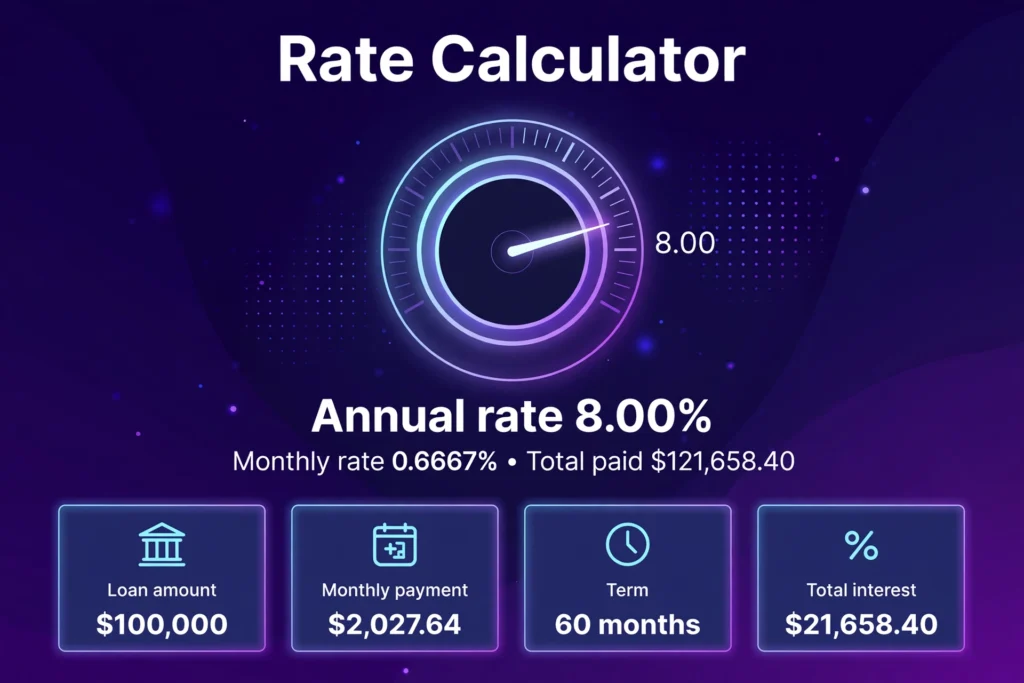
Start with the first verified test. A loan of $100,000 is repaid at $2,027.64 a month for 60 months. The tool solves the rate by bisection and returns an annual rate of 8.00% and a monthly rate of 0.6667%. The total paid is $2,027.64 × 60 = $121,658.40, and the total interest is $121,658.40 − $100,000 = $21,658.40. The check note under the results feeds 8.00% back into the payment formula and gives $2,027.64 a month, matching the entered payment exactly.
A second test uses a smaller loan. A loan of $20,000 is repaid at $386.66 a month for 60 months. The tool returns an annual rate of 6.00% (the unrounded solved rate is 6.0004%) and a monthly rate of 0.5000%. The total paid is $386.66 × 60 = $23,199.60, and the total interest is $23,199.60 − $20,000 = $3,199.60. Feeding 6.00% back into the payment formula gives $386.66 a month, matching the entered payment.
A third test shows a low rate. A loan of $15,000 is repaid at $322.67 a month for 48 months. The tool returns an annual rate of 1.58% (the unrounded solved rate is 1.5778%) and a monthly rate of 0.1315%. The total paid is $322.67 × 48 = $15,488.16, and the total interest is $15,488.16 − $15,000 = $488.16. The rate is low because the payment is only $10.17 a month above the zero-interest payment of $312.50, which is $15,000 divided by 48. A payment close to the zero-interest payment always means a low rate, and a payment far above it always means a high rate.
A fourth test uses a short loan. A loan of $5,000 is repaid at $115.15 a month for 48 months. The tool returns an annual rate of 5.00% (the unrounded solved rate is 5.0016%) and a monthly rate of 0.4168%. The total paid is $115.15 × 48 = $5,527.20, and the total interest is $5,527.20 − $5,000 = $527.20.
A fifth test shows the zero-rate case. A loan of $12,000 is repaid at $1,000 a month for 12 months. The zero-interest payment is $12,000 divided by 12, which is exactly $1,000, so the rate is 0.00%, the monthly rate is 0.0000%, the total paid is $12,000.00 and the total interest is $0.00. This is the boundary case: any payment above $1,000 a month on this loan would give a positive rate, and any payment below it would give the too-low error.
Two further checks confirm the solver against figures published by other calculator pages. A loan of $30,000 repaid at $600 a month for 60 months gives 7.42% a year and 0.6183% a month, matching the worked example on SureCalcs, which gives the same 7.42% and 0.6183% and the same Excel check, =RATE(60, -600, 30000) × 12. A loan of $20,000 repaid at $400 a month for 60 months also gives 7.42% a year and 0.6183% a month, with total interest of $4,000.00, matching the published example on ILoveCal. The same two loans in a spreadsheet give the same answers through the RATE function, which is a useful independent check on the tool.
What does it mean to solve for a rate?
Most loan calculators work in the forward direction: they take the loan amount, the rate and the term, and they return the monthly payment. This tool works in the reverse direction: it takes the loan amount, the monthly payment and the term, and it returns the rate. The two tools answer different questions. The forward direction answers "what will I pay each month at this rate?" The reverse direction answers "what rate am I actually being charged, given this payment?"
The reverse question comes up whenever the rate is missing from the paperwork in front of the reader. A car dealer may quote a monthly payment and a price without stating the rate. A private loan between family members may have a payment agreed without a rate ever being written down. An old loan statement may show the balance, the payment and the months left, but not the rate. In each case the rate is hidden inside the payment, and the only way to find it is to solve the payment formula backwards.
Solving for the rate is also how a reader checks a lender's claim. If a lender says the rate is 6% but the payment on a $20,000 loan over 60 months is $396.02, the payment belongs to a 7% loan, not a 6% loan, because a 6% loan would cost $386.66 a month. The difference is $9.36 a month and $561.60 over the term. A rate calculator turns a vague feeling that a payment looks high into a number that can be compared with the quoted rate, line by line.
The solved rate is the rate that makes the three entered numbers agree exactly. There is exactly one such rate for any loan that can be repaid: raise the rate and the payment rises, lower the rate and the payment falls, so only one rate produces the payment entered. That is why the tool can find it by narrowing a range, and why the check note under the results always matches: the solved rate, fed back into the formula, gives the entered payment.
Why does the rate need an iterative calculation?
The standard loan payment formula ties the four numbers together:
M = P × r(1+r)^n / ((1+r)^n − 1)
M is the fixed monthly payment, P is the loan amount, r is the monthly interest rate, and n is the number of monthly payments. When the rate is the unknown, the formula cannot be rearranged to put r on one side by itself, because r appears in two places: once on its own and once inside the power (1+r)^n. The equation has no closed-form algebraic solution. Every source checked for this page says the same thing, and it is the reason every rate calculator, and every spreadsheet's RATE function, finds the rate by iteration instead.
This tool uses bisection, which is the simplest reliable form of iteration. It starts with a range that must contain the answer: a monthly rate of 0% at the low end and 10% a month at the high end. It tries the middle of the range, works out the payment that rate would give, and compares it with the entered payment. If the trial payment is lower than the entered payment, the rate must be higher, so the low end moves up to the middle. If the trial payment is higher, the rate must be lower, so the high end moves down to the middle. Each step halves the range, and after about fifty steps the range is narrower than 0.00000000000001, which is far tighter than the two decimal places shown in the result. The tool caps the search at 200 steps, so it always finishes.
A worked trace shows the narrowing on the first test. The loan is $100,000 over 60 months at a payment of $2,027.64. At a monthly rate of 5% the formula gives a payment far above $2,027.64, so the high end falls. At a monthly rate of 0% the payment is $1,666.67, below $2,027.64, so the low end rises. After a few steps the range is between 0.5% and 1% a month. After more steps it closes in on 0.6667% a month, which is 8.00% a year. The final step is the check: feeding 8.00% a year back into the formula gives $2,027.64, the payment entered.
The same approach works in a spreadsheet. The Excel and Google Sheets function =RATE(60, -2027.64, 100000) × 12 returns 8.00% for the first test, and =RATE(60, -600, 30000) × 12 returns 7.42% for the SureCalcs example. The spreadsheet's RATE function uses the same idea — it guesses, checks and refines — and it returns the same answer this tool returns, which is a second independent check on the tool's arithmetic.
What is the difference between the interest rate and the APR?
The interest rate and the APR both describe the price of borrowing, but they do not measure exactly the same thing. The interest rate is the cost paid each year to borrow the money, expressed as a percentage. It does not reflect fees or any other charges. The APR, the annual percentage rate, is the interest rate plus any additional fees charged by the lender, such as origination charges, points and broker fees. Because it counts those costs, the APR is usually higher than the interest rate. That is the Consumer Financial Protection Bureau's explanation, and the federal Truth in Lending Act requires lenders to disclose the APR.
This tool returns the nominal interest rate, not necessarily the APR. The nominal annual rate is the monthly rate multiplied by 12. For the first test, the monthly rate is 0.6667%, so the nominal annual rate is 0.6667% × 12 = 8.00%. The tool has no field for fees, so it cannot count them, and a loan with origination fees would have an APR above the rate shown here. To find the APR, the same bisection would be run with the amount actually received — the loan amount minus the fees — instead of the full loan amount. A $20,000 loan with a $500 origination fee is, for APR purposes, $19,500 received and repaid at the same monthly payment, and the solved rate on $19,500 would be higher than the rate on $20,000.
There is a third rate worth knowing, the effective annual rate. The nominal rate ignores compounding: it simply multiplies the monthly rate by 12. The effective annual rate counts the compounding, because each month's interest is charged on a balance that already includes earlier interest. The formula is (1 + r)^12 − 1, where r is the monthly rate. At a nominal rate of 8%, the monthly rate is 0.6667%, and the effective annual rate is (1.006667)^12 − 1 = 8.30%. At a nominal rate of 6%, the effective annual rate is 6.17%. The effective rate is always a little above the nominal rate, by about 0.17 to 0.30 points at the rates in the tests on this page. Lenders quote the nominal rate and disclose the APR; the effective rate is the figure that shows what the compounding actually costs over a year.
For comparing two loan offers, the APR is the better number when the loans have the same type and term, because it counts the fees. The interest rate is the better number for checking a payment, because the payment is set by the rate alone. A reader who wants the cheapest loan should compare APRs; a reader who wants to know whether a quoted payment matches a quoted rate should use the rate, which is what this tool returns.
How does the rate change what a loan costs?
A small change in the rate moves the payment by more than most people expect, and the effect grows with the loan amount and the term. Take the first test loan, $100,000 over 60 months. At 7% the payment is $1,980.12 a month. At 8% it is $2,027.64. At 9% it is $2,075.84. Each extra point of rate adds about $47.86 a month, and the two-point move from 7% to 9% adds $95.72 a month, which is $5,743.20 over the five years. The total interest at 8% is $21,658.40; at 9% it would be $24,550.40, which is $2,892.00 more for one extra point.
The same pattern shows on a smaller loan. Take $20,000 over 60 months, the loan in the quick-reference table below. At 5% the payment is $377.42 a month and the total interest is $2,645.48. At 8% the payment is $405.53 a month and the total interest is $4,331.67. The payment gap is $28.11 a month, and the interest gap is $1,686.19 over the term. Three points of rate cost nearly two-thirds as much again in interest: $4,331.67 against $2,645.48.
The term matters as much as the rate. A longer term lowers the monthly payment but raises the total interest, because the borrower pays interest for more months. That trade-off is visible in the tool's own outputs: the total interest box grows as the term grows, even when the rate stays the same. A reader comparing two offers should look at the total interest box, not only the monthly payment box, because a lower payment on a longer term can still be the more expensive loan.
The rate also decides how much of each early payment is interest. In the first months of a loan, most of the payment is interest and only a small part reduces the balance. That is a property of the amortisation formula, not a choice by the lender: the interest each month is the monthly rate multiplied by the balance still owed, and the balance is highest at the start. At 8% on $100,000, the first month's interest is $666.67, which is about a third of the $2,027.64 payment. By the last months, the balance is small and almost the whole payment reduces it. The EMI calculator shows that split month by month for the first year.
What does it mean when the payment is too low to repay the loan?
Every loan has a floor payment: the loan amount divided by the term. That is the payment with no interest at all. A $10,000 loan over 12 months has a floor payment of $833.33 a month. A $100,000 loan over 60 months has a floor payment of $1,666.67 a month. Any payment below the floor cannot repay the loan, at any rate, because even at 0% the payments would add up to less than the amount borrowed. A payment of $100 a month on a $10,000 loan over 12 months adds up to $1,200, which leaves $8,800 unpaid, and no interest rate, positive or negative, can fix that.
The tool treats this as an error, not as a result. It shows the message: "That payment is too low to repay the loan. A $10,000.00 loan over 12 months needs a payment of at least $833.33, even with no interest at all. Raise the payment or lengthen the term." The message names the floor payment so the reader can see how far short the entered payment falls. The fix is one of two things: raise the payment to at least the floor, or lengthen the term so the floor falls. Lengthening a $10,000 loan from 12 months to 24 months cuts the floor payment from $833.33 to $416.67, and a $500 payment would then be enough to repay it, at a rate the tool can solve.
A payment exactly on the floor is not an error. It gives a rate of 0.00%, which is the fifth verified test: $12,000 at $1,000 a month for 12 months. A payment within one cent below the floor is also treated as 0.00%, because a one-cent shortfall is a rounding difference in the entered payment, not a loan that cannot be repaid. Only a shortfall above one cent produces the error.
This boundary is also a useful check on entered numbers. If the tool reports the too-low error on a real loan, one of the three inputs is usually wrong: the payment may be the fortnightly payment rather than the monthly one, the term may be in years rather than months, or the amount may include a deposit that was never borrowed. Checking each input against the loan paperwork, and re-entering the payment as the principal-and-interest figure only, resolves most of these cases.
How can I check the tool against the Loan Calculator?
The simplest check uses the first verified test and runs it in both directions. Enter a loan of $100,000, a payment of $2,027.64 and a term of 60 months in this tool. It should show an annual rate of 8.00%, a monthly rate of 0.6667%, a total paid of $121,658.40 and total interest of $21,658.40. Then open the loan calculator and enter the same loan amount of $100,000, a rate of 8% and a term of 60 months. It should show a monthly payment of $2,027.64. The two tools agree because they are the same formula run in opposite directions: one solves for the payment, the other solves for the rate.
A second check uses the second test. Enter $20,000, $386.66 and 60 months here, and the tool should show 6.00% a year, 0.5000% a month, $23,199.60 total paid and $3,199.60 total interest. The loan calculator with $20,000 at 6% over 60 months should show a payment of $386.66. A third check uses the zero-rate test: $12,000, $1,000 and 12 months here should show 0.00%, and the loan calculator with $12,000 at 0% over 12 months should show a payment of $1,000.00.
A fourth check uses the quick-reference table below. Pick a row, enter the loan amount of $20,000, the table's payment and a term of 60 months here, and the tool should show the table's rate. The 5% row's payment of $377.42 should give 5.00%, and the 10% row's payment of $424.94 should give 10.00%. A fifth check tests the too-low error: enter a loan of $10,000, a payment of $100 and a term of 12 months, and the tool should show the too-low message with the floor payment of $833.33, and no results.
For a fuller picture of the same loan, the EMI calculator shows the month-by-month split of each payment into interest and principal, and the compound interest calculator shows how a balance grows when interest compounds instead of being repaid. More tools in the same collection are in the calculators category.
What mistakes do people commonly make?
The first mistake is entering a payment that includes taxes, insurance or escrow. A mortgage payment of $2,500 a month may contain $400 of taxes and insurance, so the principal-and-interest payment is only $2,100. Entering $2,500 makes the tool solve for a rate far above the real one. The fix is to read the principal-and-interest figure from the loan statement or the Loan Estimate, and enter that figure alone.
The second mistake is entering the term in years instead of months. A five-year loan is 60 months, not 5. Entering 5 as the term tells the tool the loan is repaid in five months, and the solved rate comes out far too high. The tool's term box asks for months, and the placeholder shows 60 as the example.
The third mistake is entering the price of the item instead of the loan amount. A $25,000 car bought with a $5,000 deposit and a $3,000 trade-in is a $17,000 loan, not a $25,000 loan. Entering $25,000 with the real payment gives a rate far below the real one, because the tool thinks more was borrowed than was. The car payment interest calculator builds the amount financed from the price, deposit, trade-in, tax and fees, and is the right tool when those figures are known separately.
The fourth mistake is treating the solved rate as the APR. The tool returns the nominal interest rate, and the APR can be higher once fees are counted. A reader who compares the tool's 8.00% with a lender's disclosed APR of 8.40% and calls one of them wrong is comparing two different measures. The APR section above explains the difference, and the CFPB's page on the difference between a loan interest rate and the APR states it in the regulator's own words.
The fifth mistake is rounding the payment before entering it. A payment of $386.6560 entered as $387 gives a slightly different rate from a payment entered as $386.66, because the rate is sensitive to small payment changes: on a $20,000 loan over 60 months, one dollar a month moves the rate by about 0.11 points. Entering the payment to the cent, exactly as it appears on the statement, keeps the solved rate accurate to the two decimal places shown.
The sixth mistake is expecting the tool to handle a variable rate. The formula assumes one fixed rate for the whole term, with equal monthly payments. A loan whose rate changes during the term, or whose payment changes, does not have a single rate that the tool can solve for. The tool's answer for such a loan is the fixed rate that would produce the same payment, which is a useful average but not the rate on any single statement.
What are the limits of this calculator?
This calculator solves for one fixed nominal annual rate on a loan repaid in equal monthly payments. It does not handle variable-rate loans, loans with a balloon payment at the end, loans with an interest-only period, or loans where the payment changes during the term. For those loans there is no single rate that makes the formula balance, and the tool's answer would be the fixed rate that matches the entered payment, not the rate on the paperwork.
It does not calculate the APR. The APR needs the fees charged to get the loan, and this tool has no field for them. A reader who needs the APR should take the solved rate as the starting point, subtract the fees from the amount received, and solve again on the smaller amount — or use the lender's disclosed APR, which the Truth in Lending Act requires the lender to state.
It does not give financial advice, and it does not recommend one loan over another. It is an arithmetic tool: it finds the rate that makes three numbers agree. Whether a rate is good, whether a loan is affordable, and whether to accept an offer are decisions for the reader, and for a qualified adviser where the sums are large. The tool states that it is for information only, and no qualified reviewer has reviewed this page.
It also assumes the payments are monthly and equal, and that the first payment is one month after the loan starts. A loan with weekly payments, a first payment delayed by three months, or a payment holiday in the middle would need a different calculation. The term is capped at 600 months, which is 50 years, and the bisection search is capped at a monthly rate of 100%, which is 1,200% a year, so a payment far above any plausible rate produces the too-high error rather than a figure.
Finally, the rate is shown to two decimal places, and the monthly rate to four. Two loans whose true rates differ by less than 0.005 points will show the same two-decimal figure. That is a display choice, not an error: the check note under the results uses the full unrounded rate, so the payment it shows still matches the entered payment to the cent.
What is the monthly payment on $20,000 over 60 months at common rates?
The table below gives the monthly payment on the same loan the tests use: $20,000 over 60 months. Read down the payment column to find the payment that matches a rate, or enter a payment from the table into the tool and check that the rate comes back as the table says. The table uses the exact payment the formula gives, which is why the 6% row shows a total paid of $23,199.36, which is $0.24 below the $23,199.60 total in the second verified test: the test enters the payment rounded to cents, $386.66, and the table uses the exact payment, $386.6560.
| Annual rate | Monthly payment | Total paid | Total interest |
|---|---|---|---|
| 5% | $377.42 | $22,645.48 | $2,645.48 |
| 6% | $386.66 | $23,199.36 | $3,199.36 |
| 7% | $396.02 | $23,761.44 | $3,761.44 |
| 8% | $405.53 | $24,331.67 | $4,331.67 |
| 9% | $415.17 | $24,910.03 | $4,910.03 |
| 10% | $424.94 | $25,496.45 | $5,496.45 |
Frequently asked questions
How do I calculate the interest rate from a monthly payment?
Enter the loan amount, the fixed monthly payment and the term in months, then solve the payment formula M = P × r(1+r)^n / ((1+r)^n − 1) for the monthly rate r. The formula cannot be rearranged to isolate r, so the rate is found by iteration: guess a rate, work out the payment it gives, and narrow the range until the payment matches. This tool does that by bisection. For example, $20,000 at $386.66 a month for 60 months gives an annual rate of 6.00%.
What is the difference between the interest rate and the APR?
The interest rate is the cost paid each year to borrow the money, and it does not reflect fees. The APR is the interest rate plus any additional fees charged by the lender, such as origination charges, points and broker fees, so the APR is usually higher. The Consumer Financial Protection Bureau explains the difference this way, and the Truth in Lending Act requires lenders to disclose the APR. This tool returns the nominal interest rate, not necessarily the APR, because it has no field for fees.
Can I use this calculator to check a car dealer's quoted rate?
Yes. Enter the amount financed, the monthly payment quoted and the term in months, and compare the solved rate with the rate the dealer stated. If the dealer says 6% but the payment on a $20,000 loan over 60 months is $396.02, the payment belongs to a 7% loan, not a 6% loan. Make sure the payment entered is principal and interest only, with no taxes, insurance or add-ons included, and that the amount entered is the amount financed after the deposit and trade-in, not the sticker price.
Why does the calculator say my payment is too low to repay the loan?
Every loan has a floor payment: the loan amount divided by the term. That is the payment with no interest at all. A $10,000 loan over 12 months needs at least $833.33 a month, and a payment of $100 a month adds up to only $1,200, leaving $8,800 unpaid. The usual cause is a wrong input: the payment entered may be fortnightly rather than monthly, the term may be in years rather than months, or the amount may include a deposit that was never borrowed. Raise the payment to at least the floor, or lengthen the term.
How do I calculate the interest rate in Excel?
Use the RATE function with the term in months, the payment as a negative number and the loan amount as a positive number, then multiply by 12 for the annual rate. For a $30,000 loan at $600 a month for 60 months, =RATE(60, -600, 30000) × 12 returns 7.42%. For the first test on this page, =RATE(60, -2027.64, 100000) × 12 returns 8.00%. The RATE function solves by iteration, the same way this tool does by bisection, so the two answers agree.
Is the rate from this calculator the same as the effective annual rate?
No. This tool returns the nominal annual rate, which is the monthly rate multiplied by 12. The effective annual rate counts the monthly compounding, using (1 + r)^12 − 1, and it is always a little higher: at a nominal rate of 8% the effective annual rate is 8.30%, and at a nominal rate of 6% it is 6.17%. The difference is small at the rates in the tests on this page, but it grows as the rate rises. Lenders quote the nominal rate and disclose the APR; the effective rate shows what the compounding actually costs over a year.