Matching 401K Calculator
Enter your annual salary, the percentage of salary you contribute, and your employer’s match formula: the match rate and the limit for the first tier, and the match rate and the limit for the second tier. The tool works out your annual contribution, the employer match, the total going into your 401(k), the effective match rate, the match left on the table, the contribution needed for the full match, and the monthly figures.
The match is worked out tier by tier from the formula you enter. Tier 1 applies to the first part of your contribution, up to the tier 1 limit. Tier 2 applies to the next part of your contribution, up to the tier 2 limit. A plan with only one tier uses tier 2 set to 0. The monthly figures are the annual figures divided by 12. The 2026 IRS elective deferral limit for employee contributions is $24,500 (IRS Notice 2025-67); the employer match does not count toward that limit.
A 401(k) employer match is money your employer adds to your retirement account when you contribute part of your paycheck, and this calculator works out how much that match is worth for your salary and your plan’s formula. Enter your salary, your contribution rate and your employer’s match terms, and it shows your contribution, the employer match, the total going in, the match you are leaving on the table, and the contribution rate that captures the full match.
How do I use the Matching 401K Calculator?
Enter your annual salary in the first box. Use your gross salary before tax, because match formulas are written as a percentage of gross pay. A salary of $80,000 is already filled in as the example, and you should replace it with your own figure.
Enter the percentage of your salary you contribute in the second box. This is the percentage taken from each paycheck into your 401(k). If you contribute 6% of an $80,000 salary, that is $4,800 a year. If you are not contributing anything yet, enter 0: the tool will show the full match you are missing, which is the figure that matters most at that point.
Enter your employer’s match terms in the next four boxes. The tier 1 match rate is what your employer adds per dollar you contribute in the first tier, and the tier 1 limit is the percentage of salary that tier covers. The tier 2 match rate and tier 2 limit describe the second tier, if your plan has one. The boxes are already filled with the most common example formula — 100% of the first 3% plus 50% of the next 2% — but that is an example only. Read your own plan’s Summary Plan Description for the exact figures and replace them. If your plan has only one tier, enter 0 for the tier 2 rate and the tier 2 limit.
Press the calculate button and nine labelled boxes appear. The first three are the annual figures: your contribution, the employer match, and the total going into your account. The next three are the figures that drive the decision: the effective match rate as a percentage of salary, the match left on the table each year, and the contribution percentage needed for the full match. The last three are the monthly figures: your contribution, the employer match and the total, each the annual figure divided by 12.
Under the boxes, a note states the contribution rate that captures the full match and the dollar value of that full match. A warning appears when you are leaving match money on the table, stating the amount and the contribution rate that would capture it. A separate note appears when your own contribution passes the 2026 IRS elective deferral limit of $24,500, because a plan cannot accept more than that from you in a year. That limit comes from IRS Notice 2025-67, announced in IRS news release IR-2025-111, and the employer match does not count toward it.
If an input is wrong, the tool shows a plain-language error and no results. A salary of 0 is rejected because the match is worked out from your pay. A contribution below 0 or above 100 is rejected because a percentage of salary cannot fall outside that range. A match rate below 0 or above 100 is rejected for the same reason. A tier limit below 0 or above 100 is rejected, and the two tier limits added together cannot be above 100% of salary, because the tiers cover slices of your contribution and cannot cover more than all of it.
What does a worked example look like?
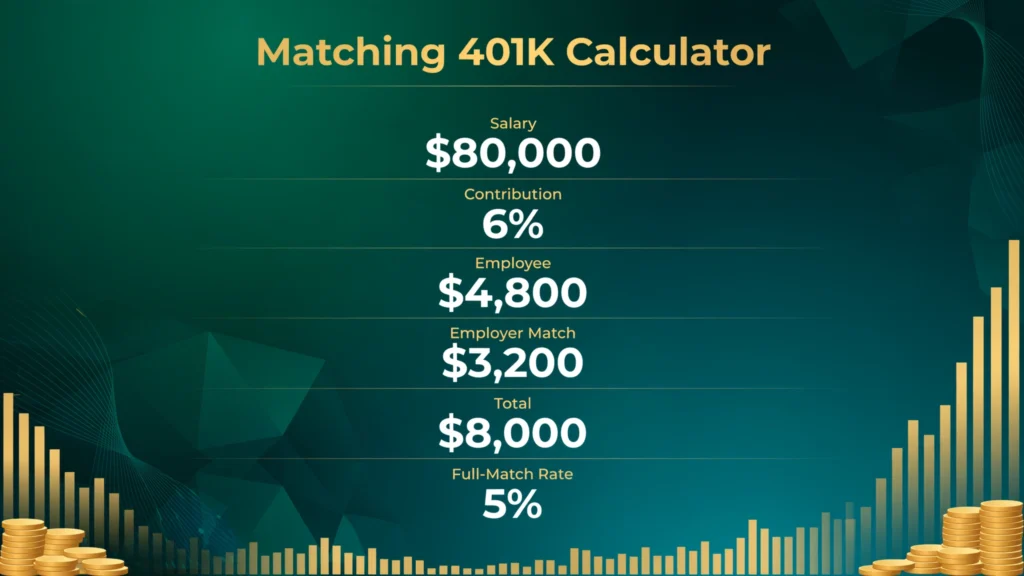
Start with the first verified test, the example the tool opens with. A salary of $80,000, a 6% contribution, and a match of 100% of the first 3% plus 50% of the next 2%. Your contribution is $80,000 × 6% = $4,800 a year, or $400.00 a month. The match is worked out in two tiers. Tier 1 matches 100% of the first 3% of salary, which is $2,400 of contribution matched dollar for dollar, so the match is $2,400. Tier 2 matches 50% of the next 2% of salary, which is $1,600 of contribution matched at half, so the match is $800. The total match is $2,400 + $800 = $3,200, the total going into the account is $4,800 + $3,200 = $8,000, and the effective match rate is $3,200 ÷ $80,000 = 4.00% of salary. The monthly figures are $400.00 from you, $266.67 from your employer, and $666.67 in total.
Change only the contribution to 3%, and the result shows why the full-match rate matters. Your contribution is $80,000 × 3% = $2,400. The match is 100% of the first 3%, which is $2,400, and the second tier pays nothing, because you contributed nothing beyond 3%. The total is $2,400 + $2,400 = $4,800, and the effective match rate is 3.00%. The match you leave on the table is $3,200 − $2,400 = $800, and the note under the tool states the 5% contribution that would capture the full match. Raising the contribution from 3% to 5% adds $1,600 of your own money and $800 of employer money, for a total of $2,400 more a year, which is $200 more a month.
Change the contribution to 0% and the tool shows the full cost of not contributing at all. Your contribution is $0, the match is $0, and the total going in is $0. The match left on the table is the whole $3,200, and the warning states that contributing 5% would capture all of it. The effective match rate is 0.00%. A worker who contributes nothing to a plan with this formula leaves $3,200 a year unclaimed, which is $266.67 a month, and over 30 years the matched money alone, before any growth, is $96,000.
Change the salary to $70,000 and the contribution to 5%, keeping the same formula, and the arithmetic works the same way. Your contribution is $70,000 × 5% = $3,500. Tier 1 matches 100% of the first 3%, which is $2,100. Tier 2 matches 50% of the next 2%, which is $700. The total match is $2,100 + $700 = $2,800, the total going in is $3,500 + $2,800 = $6,300, and the effective match rate is $2,800 ÷ $70,000 = 4.00% of salary. The match left on the table is $0, because 5% is the full-match rate for this formula. The monthly figures are $291.67 from you, $233.33 from your employer, and $525.00 in total.
A single-tier formula shows the same tier logic with one tier. Take a salary of $60,000, a 6% contribution, and a match of 50% of the first 6% of salary. Your contribution is $60,000 × 6% = $3,600. The match is 50% of $3,600 = $1,800, and the total going in is $3,600 + $1,800 = $5,400. The effective match rate is $1,800 ÷ $60,000 = 3.00% of salary, and the match left on the table is $0, because 6% is the full-match rate for that formula. A formula of 100% of the first 3% on the same salary and contribution would pay the same $1,800 match, because 3% of $60,000 is $1,800 matched dollar for dollar, and the extra 3% of contribution earns no more match.
What is a 401(k) employer match?
A 401(k) is a retirement account set up by your employer, into which you put part of each paycheck before tax. An employer match is money your employer adds to that account on top of what you put in, based on how much you contribute. It is the only part of a 401(k) that is paid by someone other than you, and it is the first money to claim before any other retirement saving, because no investment return is guaranteed in the way a match is.
The match is worked out from your salary and your contribution rate, and it is capped as a percentage of your salary. Your contribution is the percentage of salary you put in. The match is the percentage of salary your employer adds, worked out tier by tier from the formula. The total going into the account is the two added together. The tool shows all three figures, and the monthly versions of the same three figures, so the arithmetic can be checked line by line.
A match that is described as a percentage can be a percentage of salary or a percentage of your contribution, and the two are easy to confuse. A match of 100% of the first 3% means the employer adds 3% of salary when you contribute 3% of salary. A match of 50% of the first 6% means the employer adds 3% of salary when you contribute 6% of salary. The rate on the contribution is not the rate on the salary, and the figure that matters for comparing plans is the effective match rate: the employer match as a percentage of salary, which this tool shows in the fourth box.
The match is deposited into your account, usually with each paycheck, and it is invested in the funds you chose for your own contributions. It grows in the same way, and it is subject to the same withdrawal rules: withdrawals before age 59½ usually carry a 10% early withdrawal penalty on top of income tax, unless an exception applies. The match does not change your take-home pay in the way your own contribution does, because it is paid by the employer, not deducted from your paycheck.
How do I read a match formula?
A match formula is written in two parts: a rate and a cap. The rate says how many cents the employer adds per dollar you contribute. The cap says up to what percentage of your salary the employer keeps matching. A formula of 100% of the first 3% has a rate of 100% and a cap of 3%. A formula of 50% of the first 6% has a rate of 50% and a cap of 6%. The rate alone does not tell you the match: a 100% rate on a 3% cap pays the same 3% of salary as a 50% rate on a 6% cap.
Tiered formulas stack two of those pairs. The first tier applies to the first part of your contribution, and the second tier applies to the next part. The common example is 100% of the first 3% plus 50% of the next 2%: the first 3% of salary you contribute is matched dollar for dollar, and the next 2% is matched at half. The two tiers are added, not averaged: the match at a 5% contribution is 3% plus 1%, which is 4% of salary. The tier limits are the figures that decide how much you must contribute for the full match, and their sum is the full-match rate.
Three formulas cover most plans. A match of 100% of the first 3% plus 50% of the next 2% pays a maximum of 4% of salary and needs a 5% contribution for the full match. A match of 50% of the first 6% pays a maximum of 3% of salary and needs a 6% contribution. A match of 100% of the first 4% pays a maximum of 4% of salary and needs a 4% contribution. A safe harbor match of 100% of the first 3% plus 50% of the next 2% is the same formula as the first, with the added rule that it vests immediately.
The figure that decides whether a formula is generous is the effective match rate: the employer match as a percentage of salary at the full-match contribution. The three formulas above pay 4%, 3% and 4% of salary at their maximum. A formula that pays 100% of the first 6% would pay 6% of salary, and it would need a 6% contribution. The contribution rate that captures the full match is the sum of the tier caps, and this tool shows it in the sixth box.
How much do I need to contribute to get the full match?
The contribution rate that captures the full match is the sum of the tier caps in your formula. With 100% of the first 3% plus 50% of the next 2%, the caps add to 5%, so you must contribute at least 5% of salary. With 50% of the first 6%, the cap is 6%, so you must contribute 6%. With 100% of the first 3%, the cap is 3%, so you must contribute 3%. The tool works the figure out from the tiers you enter and shows it in the contribution needed for the full match box.
Contributing less than that rate leaves part of the match unclaimed, and the shortfall is the difference between the full match and the match your contribution earns. On an $80,000 salary with the common formula, contributing 3% instead of 5% leaves $800 a year unclaimed. Contributing 4% leaves $400. Contributing nothing leaves the whole $3,200. The tool states the missed amount in the match left on the table box, and the note under the tool states the contribution rate that would capture it.
Contributing above the full-match rate adds to your own savings but earns no more match, because the tiers are exhausted. On an $80,000 salary with the common formula, contributing 10% puts $8,000 of your own money in and still earns the same $3,200 match as contributing 5%, for a total of $11,200 instead of $7,200. The extra $3,000 is your money only. The monthly figures show the same split: at 5% you put in $333.33 a month and your employer adds $266.67, for $600.00 in total; at 10% you put in $666.67 and your employer still adds $266.67, for $933.33 in total. A take home pay calculator works out what a higher contribution does to the pay you take home.
What happens to the match I leave on the table?
Match money you do not earn in a year does not carry over to the next year. The match is worked out on the contributions you make in that year, and a year of contributing below the cap is a year of match that is gone. On an $80,000 salary with the 100% of the first 3% plus 50% of the next 2% formula, one year at 3% instead of 5% costs $800 of employer money. That $800 is also money that would have been invested and grown, so the cost over a career is larger than the single year’s figure — but the growth part depends on the investments you choose and on market performance, so this page does not put a number on it. The compound interest calculator lets you work out what a yearly amount becomes over a chosen number of years at a rate you enter.
The same rule applies in the other direction: the match you do earn stays in the account and is invested alongside your own contributions. On an $80,000 salary at a 6% contribution with the common formula, $3,200 of employer money goes in every year on top of your $4,800. Over ten years at that rate, that is $32,000 of employer money and $48,000 of your own money, before any investment growth — simple multiplication, $3,200 × 10 and $4,800 × 10. The match is the only part of the account that arrives without coming out of your paycheck, which is why missing it is different from simply saving less: saving less costs you your own money later, while missing the match costs you money you never had to earn.
Starting late has the same shape. If you join a plan mid-year, the match is usually worked out on the pay you earn while you are in the plan, not on the full year’s salary. If you wait a year to join, that year’s match is not waiting for you when you do. Some plans also have a waiting period before you can join at all, commonly up to a year of service, and the match starts only when participation starts. Your plan’s Summary Plan Description states the eligibility rule.
What is vesting, and when does the match become mine?
Vesting is the schedule that decides when the employer match becomes yours to keep. The money you contribute from your own paycheck is always 100% yours, from day one. The match your employer adds may be yours at once, or it may vest over time, and the schedule is set by your plan. If you leave the job before the match is fully vested, the part that has not vested is taken back by the plan, and only the vested part goes with you.
There are two structures. Under cliff vesting, you own 0% of the employer match until you hit a service milestone, then 100% all at once. The law caps the cliff for matching contributions at three years, so a three-year cliff is the longest cliff a plan can use for a match. Under graded vesting, you own a growing share each year, commonly 20% after the first year, 40% after the second, 60% after the third, 80% after the fourth, and 100% after the fifth, although the law allows graded schedules to run to six years. Safe harbor matches vest immediately: you own 100% from the day the match is deposited, with no schedule at all.
| Years of service | Cliff vesting | Graded vesting |
|---|---|---|
| 1 | 0% | 0% |
| 2 | 0% | 20% |
| 3 | 100% | 40% |
| 4 | 100% | 60% |
| 5 | 100% | 80% |
| 6 | 100% | 100% |
The table above shows the common example schedules. Your plan sets its own schedule within the federal limits, and it may be shorter or faster than these examples. A plan may also vest the match immediately, which is the same as no schedule. The schedule applies to the employer match only: your own contributions, and any earnings on them, are always yours, and the earnings on the match vest on the same schedule as the match itself.
Vesting does not change the figures this calculator shows. The tool works out the match you earn in a year, not the part of it you own on the day you leave. A worker who leaves after two years on a three-year cliff owns none of the match, even though the tool shows the full amount earned. A worker who leaves after two years on a graded schedule owns 40% of it. The match left on the table is a different figure again: it is the match you never earn, because you did not contribute enough, and it is lost whether you stay or leave.
What is a true-up, and why does per-paycheck matching matter?
Most employers work the match out per paycheck, not once a year. Each time you are paid, the employer matches the contribution from that paycheck, up to the tier limits for that paycheck. If you contribute the same percentage every month, the per-paycheck match and the annual match are the same figure. The difference appears when the contribution is uneven through the year: a worker who front-loads the whole year’s contribution into the first few months earns the match only on those months’ pay, and the later months, with no contribution, earn no match at all.
A plan feature called a true-up fixes that. A true-up is an annual reconciliation, usually paid early in the following year, that works out the match you would have earned on the whole year’s salary and contribution, and pays the difference between that figure and the match already paid per paycheck. A plan with a true-up pays the same match whether the contribution is spread evenly or front-loaded. A plan without a true-up pays less when the contribution is front-loaded, because the later months contribute nothing and earn no match.
The same per-paycheck logic applies to bonuses and uneven pay. A bonus paid in one month is matched on that month’s contribution only, and a month with no pay earns no match. A worker whose pay varies through the year should spread the contribution across the whole year, so that every paycheck carries a contribution and earns its match, unless the plan has a true-up. The tool assumes a full year at a steady salary and contribution rate, so it shows the annual figure a true-up plan would pay, and the figure a per-paycheck plan would pay only when the contribution is spread evenly.
What are the 2026 IRS limits for a 401(k)?
Two limits frame the match, and they apply to different money. The first is the employee elective deferral limit: the most you can put in from your own paycheck in a year. For 2026 that limit is $24,500, up from $23,500 in 2025, under IRS Notice 2025-67. Your own contribution, whether it goes into a traditional 401(k) or a Roth 401(k), counts toward this limit. The employer match does not count toward it, so the match can be paid on top of a contribution that already reaches the limit.
The second limit is the total annual additions limit: the most that can go into your account from all sources in a year — your contributions, the employer match, and any other employer contributions together. For 2026 that limit is $72,000, up from $70,000 in 2025, under the same notice. The match counts toward this limit, so a worker who contributes the full $24,500 and earns a large match can reach it. The limit is high enough that most workers never approach it: on an $80,000 salary, a 6% contribution and the common formula put $8,000 into the account, far below $72,000.
A third figure sets the salary the match is worked out from. For 2026, only the first $360,000 of your salary counts for the match and for the plan, up from $350,000 in 2025. A salary above that is treated as $360,000 for the match. The catch-up rules add two more figures: if you are 50 or older you can put in an extra $8,000 above the $24,500, and if you turn 60, 61, 62 or 63 during the year the catch-up is $11,250 instead. The limits change almost every year, and the tool warns you when your contribution passes the $24,500 elective deferral limit. The IRS news release IR-2025-111 lists all of the 2026 figures.
Roth 401(k) vs traditional 401(k): does the match work the same?
A traditional 401(k) contribution goes in before tax, which lowers the taxable pay on that paycheck, and the money is taxed when you withdraw it in retirement. A Roth 401(k) contribution goes in after tax, which leaves the taxable pay unchanged, and the money is not taxed when you withdraw it in retirement, provided the account has been open for five years and you are at least 59½. The contribution limit of $24,500 applies to the two together, not to each one separately, so the choice is about tax timing, not about how much you can put in.
The employer match follows the same formula either way: the match is worked out from your contribution rate and your salary, not from whether your contributions are pre-tax or Roth. The difference is in how the match itself is taxed. In most plans the match goes in as pre-tax money, even when your own contributions are Roth, so the match is taxed when you withdraw it. Since the SECURE 2.0 rules took effect, an employer may instead offer the match as designated Roth money, which is taxed when it is deposited and not taxed when it is withdrawn. The match is the same amount either way: the tax treatment is the only difference, and it is set by the plan, not by you.
The choice between Roth and traditional is a tax question that depends on your current tax rate, your expected tax rate in retirement, and whether your plan offers a Roth match. A worker in a low tax bracket now, who expects a higher rate in retirement, gains from Roth contributions. A worker in a high tax bracket now, who expects a lower rate in retirement, gains from traditional contributions. The match does not change the choice: it is paid on the contribution either way, and the tool shows the same match for the same salary, contribution rate and formula, whichever type of account the money goes into. A rate calculator works out the percentage change between two figures, which is the same arithmetic the tool uses for the effective match rate.
What is a good 401(k) match?
A match worth around 4% to 6% of salary is generally treated as good, and the figures behind that range come from large-plan data. Vanguard’s How America Saves 2026 report puts the average promised match at 4.7% of pay, and the average value of the match actually received at 4.5% of pay. A plan that pays 4% of salary at its maximum is close to the average, and a plan that pays 6% is above it. The common example formula in this tool pays 4.0% of salary at its maximum, which is just below the average promised match, and the single-tier formula of 100% of the first 6% pays 6%, which is above it.
Vesting changes the judgement. A 4% match with immediate vesting is worth more to a worker who may change jobs than a 6% match on a three-year cliff, because the 6% match is worth nothing if the worker leaves before the cliff. A match that vests immediately is worth its full face value from day one. A match on a graded schedule is worth the vested share at the point the worker leaves. The tool shows the match earned, not the match owned, so the vesting schedule has to be read alongside the figures.
The other way to judge a match is by what it takes to earn it. Vanguard’s report puts the average contribution needed for the full match at 6.4% of pay, with a median of 6.0%. A plan that pays its full match for a 5% contribution, like the common example, asks less than the average. A plan that needs a 10% contribution for its full match asks more, and the extra contribution is your money, not the employer’s. The match rate and the contribution needed for it are the two figures to compare, and this tool shows both.
How much does a 401(k) grow per year on average?
There is no single average growth rate for a 401(k), because the growth comes from the investments inside the account, not from the account itself. A 401(k) holds funds you choose — often stock funds, bond funds, or a target-date fund — and the return in any year depends on those funds and on market performance. One worker’s account can rise in a year when another worker’s account falls, because they hold different funds. Any page that states one fixed average return for all 401(k) accounts is inventing a figure, and this page does not do that.
Two parts of the account do have fixed figures, and they are the parts this tool measures. The first is your own contribution, which is a percentage of salary you choose. The second is the employer match, which is a percentage of salary set by your plan’s formula. On an $80,000 salary with the common formula and a 6% contribution, the account receives $8,000 a year — $4,800 from you and $3,200 from your employer — and that $8,000 is the same every year the salary and the rate stay the same, whatever the markets do. The match is the only part of the return that is fixed by the plan rather than by the market, and it arrives at a rate you can work out exactly: 4.00% of salary in that example.
To see what a fixed yearly amount becomes over time, use a growth figure you choose yourself and label it as an assumption. The compound interest calculator does that arithmetic: enter the yearly total as the principal, a rate you pick, and the number of years. That keeps the assumed rate visible as your choice rather than presenting it as a fact about 401(k) accounts in general.
What mistakes do people commonly make with the employer match?
The first mistake is contributing below the full-match rate without knowing it. The match formula is written in the plan documents, and many workers set a contribution rate when they join — often the default rate, which can be as low as 3% — and never check it against the formula. On an $80,000 salary with the common formula, a 3% contribution earns a $2,400 match and leaves $800 on the table every year. The tool shows the missed amount in the match left on the table box, and the note states the contribution rate that would capture it. Check the rate once a year, and after any pay rise, because the full-match rate is a percentage of salary and does not change with pay, but the dollar value of the missed match rises with it.
The second mistake is reading only the headline rate and missing the cap. A plan that matches 100% sounds better than a plan that matches 50%, but a 100% match on the first 3% pays 3% of salary, while a 50% match on the first 6% also pays 3% of salary. The figure that matters is the effective match rate at the full-match contribution, which the tool shows in the fourth box. A plan that matches 100% of the first 6% pays 6% of salary, which is twice either of those. Read the rate and the cap together, and work out the maximum match in dollars for your own salary before comparing plans.
The third mistake is forgetting that the match vests. A worker who leaves after two years on a three-year cliff owns none of the match, even though the statements showed it. The match is only yours when it vests, and the schedule is set by the plan. A safe harbor match vests immediately, and it is the only match that is yours from day one. Before changing jobs, check the vesting schedule and the date the next part vests: staying a few months longer can be worth thousands of dollars of match that would otherwise be taken back.
The fourth mistake is front-loading the contribution into the first months of the year. A worker who puts the whole year’s contribution in by March earns the match only on those months’ pay, and the later months, with no contribution, earn no match at all, unless the plan has a true-up. The tool assumes a full year at a steady rate, so it shows the figure a true-up plan would pay. Spread the contribution across the whole year, so that every paycheck carries a contribution and earns its match, or check whether the plan has a true-up before front-loading.
The fifth mistake is counting the employer match toward the $24,500 elective deferral limit. The match does not count toward that limit, which applies only to your own contributions. A worker who stops contributing at $24,500 minus the match is leaving money on the table: the match is paid on top of the $24,500, not inside it. The match does count toward the $72,000 total annual additions limit, but that limit is high enough that most workers never approach it. The tool warns you when your own contribution passes $24,500, and it does not count the match toward that figure.
The sixth mistake is assuming the match is automatic. The match is paid only on what you contribute, and only up to the formula’s limits. A worker who never joins the plan, or who contributes 0%, earns no match at all. A worker who joins late in the year earns the match only on the contributions made after joining. A worker on unpaid leave earns no match for the months with no pay. The match is not a benefit that arrives by itself: it is paid in exchange for a contribution, and the contribution has to be made first.
The seventh mistake is entering the wrong tier. A plan that matches 100% of the first 3% plus 50% of the next 2% has tier limits of 3% and 2%, and tier rates of 100% and 50%. Entering the limits as 3% and 5% would double-count the first tier, because the second tier covers the next 2%, not the first 5%. Entering the rates the wrong way round — 50% for tier 1 and 100% for tier 2 — would pay the match on the wrong part of the contribution. The tool shows the match tier by tier in the worked example, so the tiers can be checked against the plan documents before the figures are trusted.
What are the limits of this calculator?
This calculator models a two-tier matching formula on one salary and one contribution rate for a whole year. It assumes the salary stays the same all year, the contribution rate stays the same all year, and the match is worked out on the annual figures. It does not model a salary that changes part-way through the year, a contribution rate that changes, a bonus paid in one month, or a true-up paid at the end of the year. Those cases need the plan’s own figures, because the per-paycheck match and the annual match differ when the pay or the contribution is uneven.
It does not model non-elective contributions, profit sharing, or any other employer money that does not depend on your contribution. A plan that pays a 3% non-elective contribution on top of the match puts that 3% in whether you contribute or not, and this tool does not show it. It does not model a Roth match that is taxed when deposited, because the match figure is the same either way and only the tax treatment differs. It does not model vesting: the match it shows is the match earned, not the match owned, and the vesting schedule has to be read alongside the figures.
The IRS figures in the tool and the article are the 2026 figures from IRS Notice 2025-67: a $24,500 elective deferral limit, an $8,000 catch-up at age 50 or older, an $11,250 catch-up for ages 60 to 63, a $72,000 total annual additions limit, and a $360,000 compensation limit. The figures change almost every year, and the tool uses the 2026 figures. The figures this tool shows are estimates worked out from the formula you enter, and they are not tax advice. A plan’s Summary Plan Description is the document that states the formula, the vesting schedule and the true-up rule for your plan, and it is the document to check before acting on the figures.
How can I check the tool against a known match?
The simplest check uses the first verified test. Enter a salary of $80,000, a contribution of 6%, a tier 1 rate of 100% with a 3% limit, and a tier 2 rate of 50% with a 2% limit. The tool should show your annual contribution as $4,800.00, the employer match as $3,200.00, the total going in as $8,000.00, the effective match rate as 4.00%, the match left on the table as $0.00, the contribution needed for the full match as 5.00%, and the monthly figures as $400.00 from you, $266.67 from your employer and $666.67 in total. The note under the tool should state that 5% captures the full match, and that the full match is worth $3,200 a year.
Check the tier logic by changing only the contribution. At 3% on the same salary and formula, the tool should show your contribution as $2,400.00, the match as $2,400.00, the total as $4,800.00, the effective match rate as 3.00%, the match left on the table as $800.00, and the contribution needed for the full match as 5.00%. At 0%, the tool should show your contribution as $0.00, the match as $0.00, the total as $0.00, the effective match rate as 0.00%, and the match left on the table as $3,200.00. The warning should state that contributing 5% would capture the full match.
Check a single-tier formula by setting the tier 2 rate and limit to 0. Enter a salary of $60,000, a contribution of 6%, a tier 1 rate of 50% with a 6% limit, and a tier 2 rate of 0% with a 0% limit. The tool should show your contribution as $3,600.00, the match as $1,800.00, the total as $5,400.00, the effective match rate as 3.00%, the match left on the table as $0.00, and the contribution needed for the full match as 6.00%. The same salary and contribution with a tier 1 rate of 100% and a 3% limit should show the same $1,800.00 match, because 3% of $60,000 is $1,800 matched dollar for dollar.
Check the limit warning by entering a contribution that passes the 2026 IRS elective deferral limit. Enter a salary of $100,000 and a contribution of 30%. Your contribution is $30,000, which is above the $24,500 limit, so the tool should show the warning that the contribution is above the 2026 IRS elective deferral limit of $24,500. The match is still worked out from the formula: with the common formula, the match is $4,000, because the tiers cap the match at 4% of salary. The tool does not cap your contribution at $24,500, because the limit is a warning, not an error: the contribution is entered, the match is worked out, and the warning is shown alongside.
Check the error cases by entering a figure the tool rejects. A salary of 0 should show an error and no results. A contribution of 101 should show an error, because a percentage of salary cannot be above 100. A tier 1 rate of 101 should show an error for the same reason. A tier 1 limit of 60 and a tier 2 limit of 50 should show an error, because the two limits added together are 110%, which is above 100% of salary. A tier 1 limit of −1 should show an error, because a limit cannot be below 0.
The formula behind the tool is the tier-by-tier match arithmetic set out in WorkCalcs’ 401(k) match calculator, which pays the full match only when the contribution covers all the tiers. The second example in the worked section was checked against Varnda’s employer match calculation, and the third against LegalClarity’s 401(k) match calculator, which both use the same tier-by-tier arithmetic on the same inputs. The 2026 IRS figures come from IRS news release IR-2025-111, announced in IRS Notice 2025-67. The calculators category lists the other calculators on this site.
How much employer match do common salaries earn?
Every figure in this table was computed from the same tier-by-tier formula the tool uses, with the common example formula of 100% of the first 3% plus 50% of the next 2%. The employer match shown is the most the employer will add at each contribution rate, and the full match at every salary is reached at a 5% contribution. For a different formula, enter your own tiers in the tool: the table shows the shape of the result, not your plan’s figures.
| Salary | 3% contribution | 5% contribution | 6% contribution | 10% contribution |
|---|---|---|---|---|
| $50,000 | $1,500 | $2,000 | $2,000 | $2,000 |
| $80,000 | $2,400 | $3,200 | $3,200 | $3,200 |
| $100,000 | $3,000 | $4,000 | $4,000 | $4,000 |
Three patterns in the table are worth reading. First, the match stops growing at 5% at every salary: contributing 6% or 10% earns no more match than contributing 5%, because the tier caps are exhausted. Second, the missed match at 3% is $500 on a $50,000 salary, $800 on an $80,000 salary and $1,000 on a $100,000 salary — the gap between the full match and the 3% match at each salary. Third, the totals show what the match adds to your own money: at $80,000 and 5%, your $4,000 plus the $3,200 match puts $7,200 into the account each year, while at 3% your $2,400 plus the $2,400 match puts in $4,800 — a $2,400 a year difference from a 2% change in the contribution rate, of which $800 is employer money.
Frequently asked questions
How does a 401(k) employer match work?
Your employer adds money to your 401(k) when you contribute part of your paycheck, following a formula in your plan documents. A common formula is 100% of the first 3% of salary you contribute plus 50% of the next 2%, which pays an extra 4% of salary when you contribute at least 5%. The match is capped as a percentage of salary, so contributing above the cap earns no extra match. If you contribute nothing, your employer adds nothing.
How much do I need to contribute to get the full employer match?
Add the tier caps in your formula together. With 100% of the first 3% plus 50% of the next 2%, the caps add to 5%, so you must contribute at least 5% of salary. With 50% up to 6%, you must contribute 6%. With 100% up to 4%, you must contribute 4%. This calculator works the figure out from the tiers you enter and shows it in the “contribution needed for the full match” box.
What happens if I contribute less than the full-match rate?
You leave part of the match unclaimed, and it does not carry over to the next year. On an $80,000 salary with the common formula of 100% of the first 3% plus 50% of the next 2%, contributing 3% instead of 5% leaves $800 a year on the table. Contributing nothing leaves the whole $3,200 on the table. This calculator states the missed amount in dollars and the contribution rate that would capture it.
Does the employer match count toward the 401(k) contribution limit?
No, not toward your own limit. For 2026 the IRS elective deferral limit for employee contributions is $24,500 (IRS Notice 2025-67), and the employer match does not count toward it. The match does count toward the separate $72,000 total annual additions limit, which covers your contributions, the employer match and any other employer contributions together.
What is vesting, and when do I own the employer match?
Vesting is the schedule that decides when the employer match becomes yours to keep. Your own contributions are always 100% yours. The match may vest on a cliff schedule — 0% until a milestone, then 100%, with the cliff capped at three years for matching contributions — or on a graded schedule that rises over up to six years, commonly 20% a year. Safe harbor matches vest immediately. If you leave before you are fully vested, the plan takes back the unvested part.
Is a Roth 401(k) match different from a traditional 401(k) match?
The formula is the same either way: the match is worked out from your contribution rate and your salary, not from whether your contributions are pre-tax or Roth. The difference is tax treatment. In most plans the match goes in as pre-tax money even when your contributions are Roth, so it is taxed when you withdraw it. Some plans may offer the match as designated Roth money instead, in which case it is taxed when deposited. Your plan documents state which treatment your plan uses.